Shared-memory arena transport benchmark
Running a data pipeline in a subprocess with
run_pipeline_in_subprocess() can isolate loader work from the
training process. It also adds a boundary: every output from the subprocess
has to reach the trainer. For large NumPy arrays, raw bytes, or demuxed
spdl.io.VideoPackets, serializing and copying the payload through
ordinary IPC can consume substantial host CPU time. See The Cost of Inter-Process Communication for how
that cost arises. PyTorch tensors can already use a shared-storage reducer, so
their baseline is different.
How arena transport works
An arena is a preallocated region of shared memory that both processes map. The producer writes supported binary fields into the arena. The queue carries a small description of where to find the bytes, rather than the bulk payload. The producer still writes into shared storage, and unsupported fields can still go through ordinary IPC.
Two arena backends are available through the arena argument:
SharedMemorySegmentPoolgives the consumer views of supported data in shared storage. A segment cannot be reused while the consumer holds a view or another reference to the same storage. When no segment is available, the producer can wait for the consumer to release one.SharedMemoryRingBuffercopies each payload into independent consumer-owned memory, then frees the space in the ring. Keeping an output does not keep its ring space occupied. By default the producer waits for space up toacquire_timeout; set it to zero only if you want a full ring to raise immediately.
For example, to try a segment pool with an existing pipeline builder:
from spdl.pipeline import SharedMemorySegmentPool, run_pipeline_in_subprocess

# Size for all offloaded fields in one output, including alignment overhead.
arena = SharedMemorySegmentPool(segment_size=64 << 20, count=8)
source = run_pipeline_in_subprocess(
    backend.get_config(), num_threads=num_threads, arena=arena
)
See Shared-memory arenas for sizing, storage lifetime, and teardown. The sizes above are illustrative; count both queued outputs and shared storage still held by the consumer.
Effect on CPU, throughput, and memory
The benchmark_arena_transport example sends a fixed dataset from a
subprocess to a consumer over three transports: ordinary IPC, a shared-memory
ring buffer, and a shared-memory segment pool. Each row in the figure shows a
payload type; the columns show receive throughput, CPU time, and peak resident
memory on a CPU-only host.
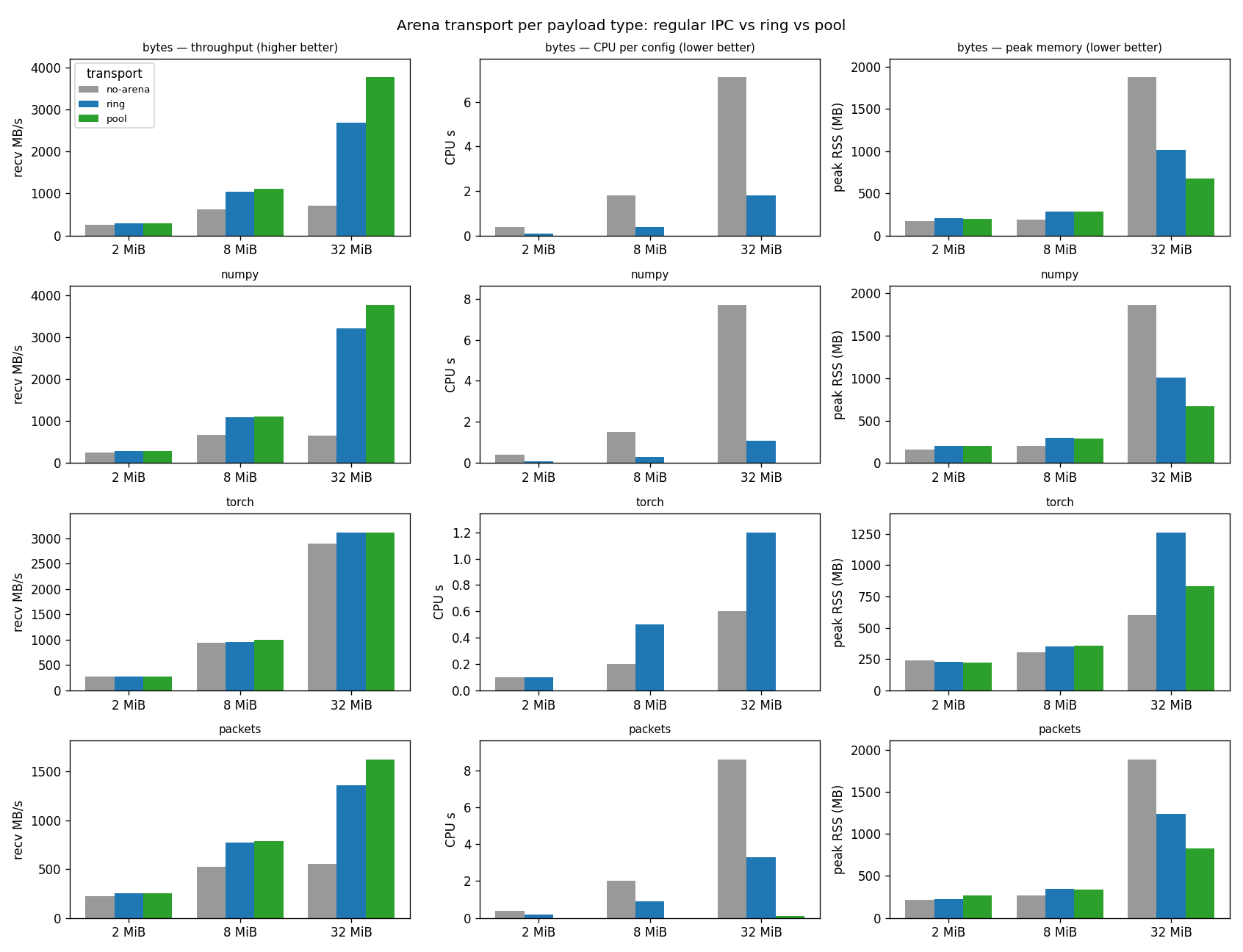
CPU: In this run, the segment pool used much less transfer CPU than ordinary IPC. The difference was smaller for PyTorch tensors, whose multiprocessing reducer can pass a handle to shared CPU tensor storage rather than sending all of the tensor’s bytes through the queue.
Throughput: The segment pool improved receive throughput. The largest differences were for bytes and NumPy arrays, especially at larger payloads.
Peak memory: For bytes, NumPy arrays, and packets, ordinary IPC used more peak memory in this run. It included transient pickle buffers, whereas the pool reused its fixed shared region. This is a result for the measured allocations, not a universal ranking of the transports.
Relation to the noisy neighbour
Buffering and concurrency can improve data readiness. An arena addresses a separate cost: it can make each transfer cheaper in CPU time. If loader work competes with the trainer for CPU resources, reducing IPC work can give the trainer more opportunity to launch GPU kernels on time. This benchmark measures transfer costs, not training throughput. Use the Noisy Neighbour guide to diagnose interference on your workload.
When to use it
Compare an arena when an isolated loader repeatedly sends large payloads and profiling shows meaningful serialization, allocation, or copy costs. Small messages may not justify an arena. Choose a pool if the consumer can release shared views promptly, or a ring if the consumer needs independent buffers. Size a ring for the total in-flight bytes, not just the largest item, and count retained copy-out buffers in the host memory budget. Compare throughput and memory end to end before choosing either transport.