Video Color Space
By default, spdl.io decodes video frames to RGB24 so they can be fed
directly into models that expect RGB tensors. When this default is not what
you want, spdl.io can also decode into the codec’s native YUV color space
or into other pixel formats. This is useful when:
You want to skip the YUV → RGB conversion and let your model (or downstream GPU code) consume YUV directly.
You have a model trained on YUV inputs (e.g. NV12 from a hardware decoder).
You want to reduce memory traffic.
yuv420pis roughly half the size ofrgb24for the same resolution.
This page covers the supported pixel formats, the resulting tensor shapes,
and how to control which one spdl.io produces.
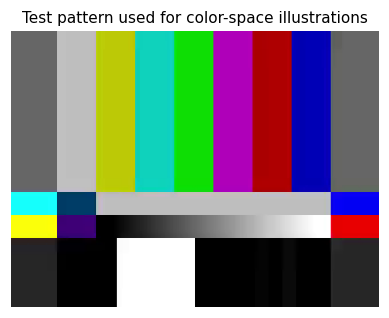
The filter_desc argument
Color-space conversion in spdl.io is controlled by the
filter_desc argument passed to spdl.io.load_video(),
spdl.io.decode_packets(), and related functions.
There are three modes:
Unset (default).
spdl.iobuilds a filter graph that converts the output torgb24. This is the easy path for models that expect RGB.import spdl.io # Decoded to rgb24 — shape (num_frames, H, W, 3), dtype uint8. buffer = spdl.io.load_video("video.mp4")
Explicit pixel format. Use
spdl.io.get_video_filter_desc()to pick a differentpix_fmt.filter_desc = spdl.io.get_video_filter_desc(pix_fmt="yuv420p") buffer = spdl.io.load_video("video.mp4", filter_desc=filter_desc)
Disabled (``filter_desc=None``). No filter graph is constructed and no pixel-format conversion happens. The buffer keeps the codec’s native pixel format — for most codecs this is
yuv420p. This is the cheapest path when you do not need RGB.buffer = spdl.io.load_video("video.mp4", filter_desc=None)
Supported pixel formats
The following pixel formats are recognised by spdl.io when converting
decoded frames into a buffer. See spdl.io.get_video_filter_desc()
for the parameter reference.
|
Layout |
Channels |
Buffer shape (per video) |
Notes |
|---|---|---|---|---|
|
Interleaved |
3 |
|
Default. NHWC, |
|
Interleaved |
4 |
|
NHWC, |
|
Interleaved |
1 |
|
Single luma channel, |
|
Planar |
3 |
|
NCHW. Three full-resolution planes (Y, U, V).
|
|
Planar (packed) |
1 |
|
Y plane on top ( |
|
Planar (packed) |
1 |
|
Y plane on top, U and V planes (each |
|
Semi-planar (packed) |
1 |
|
Y plane on top, U/V interleaved underneath. The native format of many hardware decoders (e.g. NVDEC). |
In every case, N is the number of decoded frames, H and W are
the frame dimensions, and the dtype is uint8.
Examples
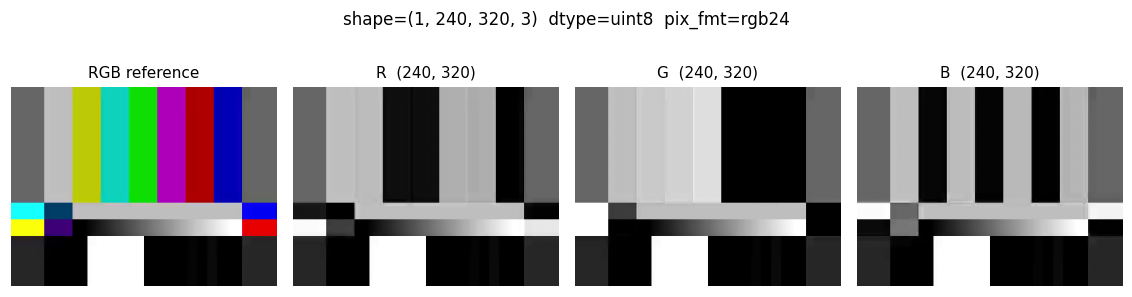
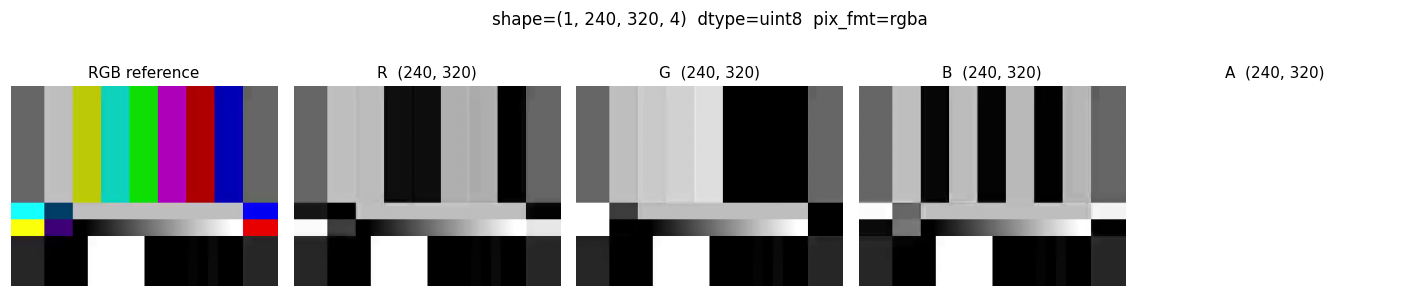
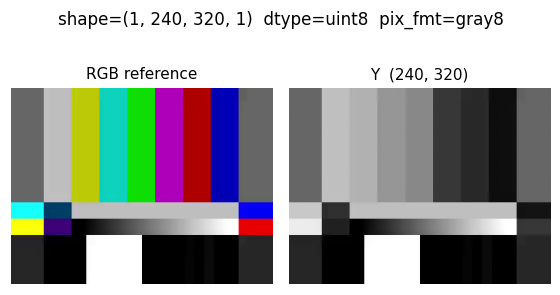
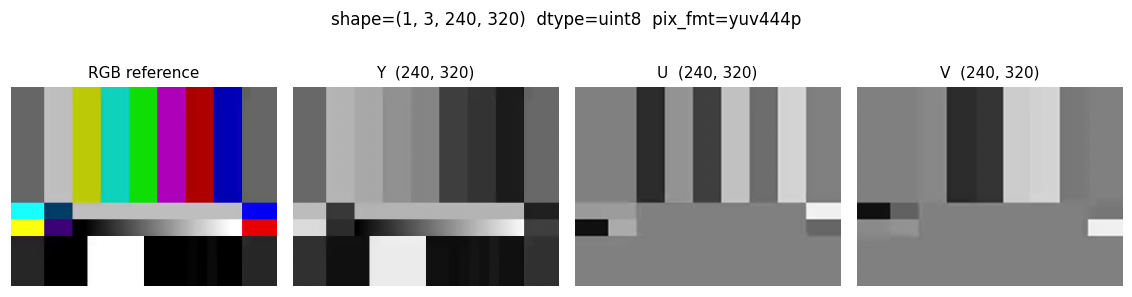
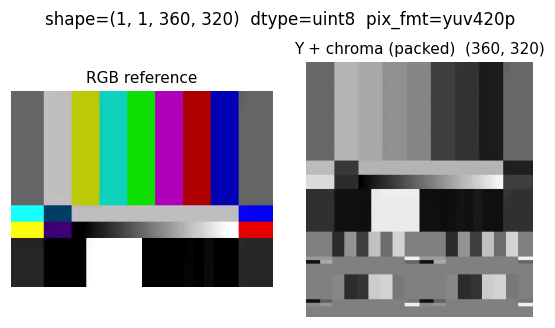
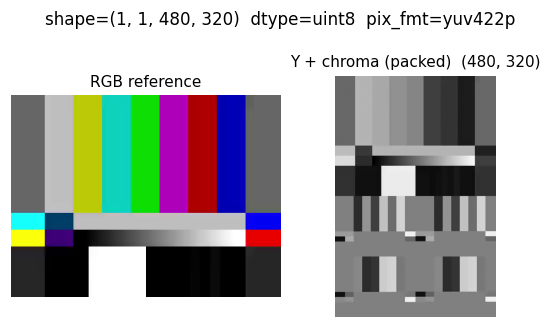
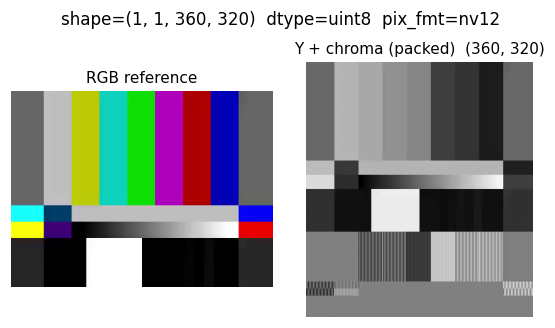
The figures below illustrate each pixel format on the same source frame. The
left panel is the canonical RGB rendering (decoded with the default
filter_desc); the remaining panels are the raw planes that spdl.io
returns, plotted as grayscale images at their actual resolution. The buffer
shape is shown in the title.
RGB24 (default)
Three interleaved channels stored in NHWC order — the simplest layout, and what most PyTorch / NumPy code expects.
buffer = spdl.io.load_video("video.mp4")
array = spdl.io.to_numpy(buffer)
# array.shape == (num_frames, H, W, 3)
RGBA
Same as RGB24 but with an alpha channel. Useful for sources that carry transparency.
filter_desc = spdl.io.get_video_filter_desc(pix_fmt="rgba")
buffer = spdl.io.load_video("video.mp4", filter_desc=filter_desc)
# array.shape == (num_frames, H, W, 4)
Grayscale (gray8)
A single luma channel.
filter_desc = spdl.io.get_video_filter_desc(pix_fmt="gray8")
buffer = spdl.io.load_video("video.mp4", filter_desc=filter_desc)
# array.shape == (num_frames, H, W, 1)
YUV 4:4:4 — full chroma resolution
True planar YUV: three independent planes at full resolution, in NCHW order.
filter_desc = spdl.io.get_video_filter_desc(pix_fmt="yuv444p")
buffer = spdl.io.load_video("video.mp4", filter_desc=filter_desc)
# array.shape == (num_frames, 3, H, W)
YUV 4:2:0 — codec-native chroma subsampling
The native pixel format for most H.264 / H.265 / VP9 video. The chroma
planes are subsampled by 2× in both dimensions and packed below the luma
plane in a single (H + H/2) × W buffer. Total size is 1.5× H × W,
half the size of rgb24.
filter_desc = spdl.io.get_video_filter_desc(pix_fmt="yuv420p")
buffer = spdl.io.load_video("video.mp4", filter_desc=filter_desc)
# array.shape == (num_frames, 1, H + H // 2, W)
YUV 4:2:2 — chroma subsampled horizontally
Chroma subsampled by 2× horizontally only. The packed buffer is
2H × W — Y on top, U and V each H × W/2 packed beneath.
filter_desc = spdl.io.get_video_filter_desc(pix_fmt="yuv422p")
buffer = spdl.io.load_video("video.mp4", filter_desc=filter_desc)
# array.shape == (num_frames, 1, 2 * H, W)
NV12 — semi-planar YUV 4:2:0
NV12 has the same total size and Y layout as yuv420p but interleaves U
and V samples (UVUVUV...) in a single chroma plane. This is the format
emitted by many hardware decoders (including NVDEC); decoding directly into
NV12 avoids a deinterleave step.
filter_desc = spdl.io.get_video_filter_desc(pix_fmt="nv12")
buffer = spdl.io.load_video("video.mp4", filter_desc=filter_desc)
# array.shape == (num_frames, 1, H + H // 2, W)
Skipping the conversion entirely
Passing filter_desc=None disables the filter graph altogether. The
returned buffer keeps whatever pixel format the decoder produces — for
software H.264 / H.265 / VP9 decoders this is almost always yuv420p.
# No filtering, no color conversion, no scaling.
buffer = spdl.io.load_video("video.mp4", filter_desc=None)
Use this mode when:
You want maximum decoding throughput and do not need RGB.
You will do color conversion later on the GPU (often cheaper than on the CPU).
You want to be sure
spdl.iois not silently inserting ascaleorformatfilter.
When filter_desc is None, other filter-graph features
(scale_width / scale_height, crop_width / crop_height,
num_frames padding, timestamp trimming, etc.) are also disabled —
those are all built on top of the filter graph. If you need any of them,
pass an explicit filter_desc instead.
See also
Filter Graphs — full guide to constructing filter descriptions.
FFmpeg CLI Cheat Sheet — the
pix_fmtrow sits in theget_video_filter_desctable.spdl.io.get_video_filter_desc()— Python API reference.