Shared-Memory Arena
High CPU utilization starves the GPU — the noisy neighbour effect — so an efficient training pipeline keeps total CPU utilization low.
Running the data pipeline in a subprocess
(run_pipeline_in_subprocess()) isolates the data-loading CPU work from
the training process, which already helps. But it introduces a new cost: every
item produced in the subprocess must cross the process boundary to reach the
training process. By default this is done by pickling the item and copying
the bytes through a multiprocessing queue — work that is paid on both sides and
that grows with the payload size. For pipelines that move large payloads per item
(NumPy arrays, Torch tensors, raw bytes, or spdl.io.VideoPackets),
this transfer is itself a meaningful source of host CPU usage — the very thing we
are trying to keep low. See The Cost of Inter-Process Communication for why crossing a process boundary
is expensive in the first place.
The shared-memory arena removes most of that cost.
How it works
An arena is a pre-allocated region of shared memory that both processes map. Instead of pickling a large binary into the IPC queue, the producer writes it into the arena and sends only a small reference; the consumer reads it back out of shared memory. The bulk bytes never travel through the pickle/queue path, so the per-item transfer CPU drops sharply.
Two backends are available, both passed via the arena argument of
run_pipeline_in_subprocess():
SharedMemorySegmentPool— the consumer restores a zero-copy view that points directly at the shared memory, so it does essentially no per-item work. The pool blocks the producer when all segments are in use, so a slow consumer simply throttles the producer rather than overflowing. This is the recommended backend.SharedMemoryRingBuffer— the consumer copies each payload out of the ring into a private buffer (so it never hands out a live view into shared memory). This is still far cheaper than pickling, but the ring is non-blocking: if it is too small for the number of in-flight items it raisesshared-memory arena full. Size itscapacityfor the in-flight high-water mark (roughly(buffer_size + 2) × max_item_bytes).
from spdl.pipeline import SharedMemorySegmentPool, run_pipeline_in_subprocess

# segment_size: the largest single item; count: a few in-flight units.
arena = SharedMemorySegmentPool(segment_size=64 << 20, count=8)

source = run_pipeline_in_subprocess(
    backend.get_config(), num_threads=num_threads, arena=arena
)
Effect on CPU, throughput, and memory
The benchmark_arena_transport example ships a fixed dataset from a
subprocess to the main process over the three transports —
plain IPC (no arena), the ring buffer, and the segment pool — and measures, per
configuration, the receive throughput, the CPU time spent, and the peak resident
memory.
The figure below summarizes a run on a CPU-only host (one row per payload type; columns are throughput, CPU, and peak memory; bars compare the three transports):
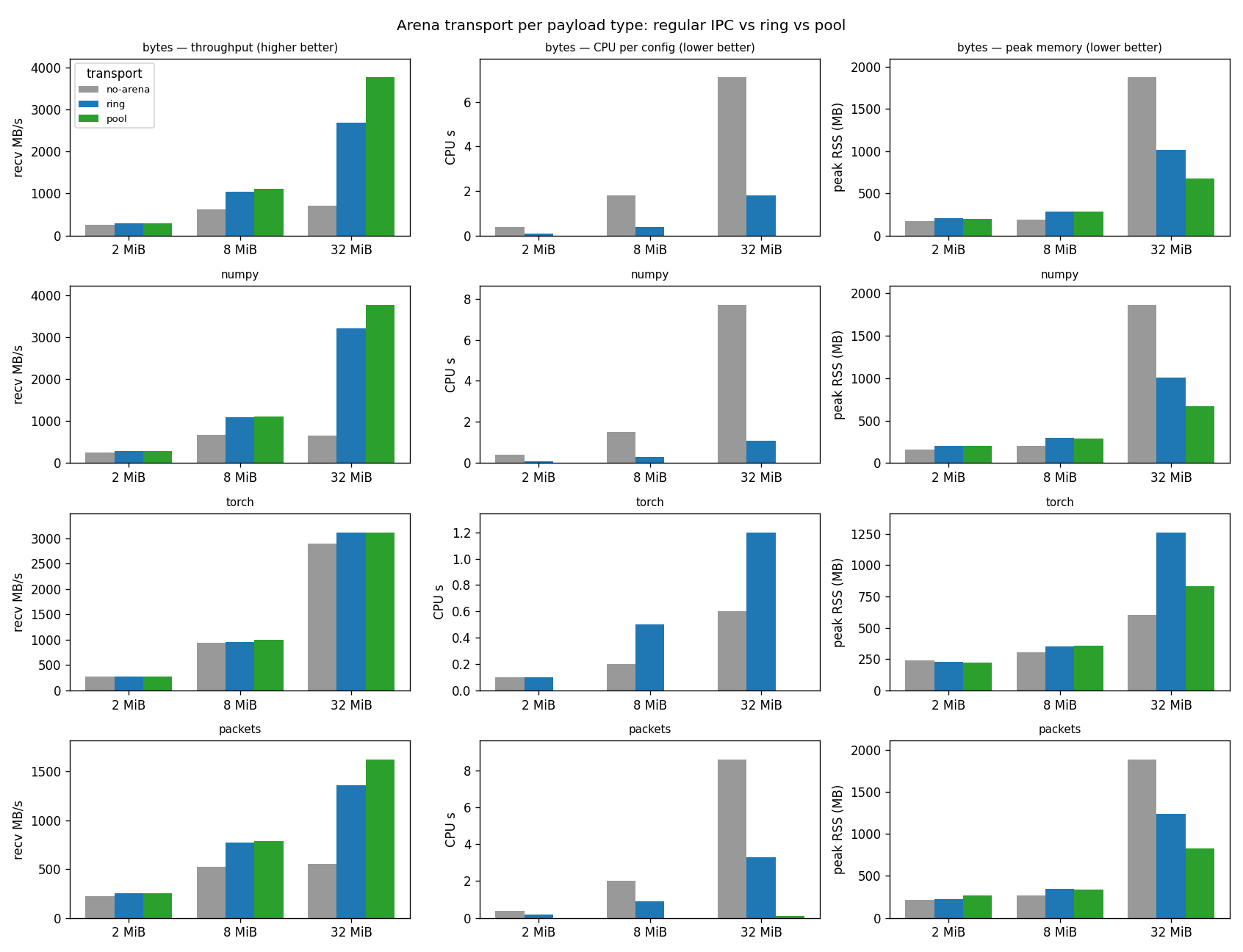
The pattern is consistent across payload types:
CPU — the segment pool spends close to zero CPU moving a payload, while plain IPC spends several CPU-seconds per configuration at 32 MiB pickling and copying. This is the property that matters most for training: it returns host CPU to the budget.
Throughput — the arena also moves data faster, and the gap widens with payload size (largest for
bytesand NumPy arrays).Peak memory — for
bytes/ NumPy / packets the transient pickle buffers of plain IPC are the heaviest; the pool’s fixed shared region is the lightest.
Torch tensors are a special case: torch’s own multiprocessing reducer already
moves a tensor’s storage through shared memory, so plain IPC does not pay a bulk
copy for them — the arena’s CPU win is therefore smallest for tensors (though the
pool still drops their transfer CPU to ~0).
Relation to the noisy neighbour
The arena does not make the data more available — that is what buffering and concurrency tuning are for. What it does is make the transfer cheaper in CPU. Because the host CPU is the shared resource that launches GPU kernels, every CPU-second the arena saves on IPC is a CPU-second available for timely kernel launches. In other words, the arena attacks the noisy neighbour from the supply side: it lets a subprocess pipeline move large payloads while consuming far less of the CPU budget that the training loop depends on.
When to use it
Use an arena when an MTP pipeline moves large payloads per item (≳ 1 MiB): decoded tensors, large arrays, raw bytes, or demuxed packets.
Prefer
SharedMemorySegmentPool(zero-copy, blocking). UseSharedMemoryRingBufferwhen a copy-out is acceptable, and size it for the in-flight high-water mark.For small payloads the transfer CPU is already negligible, so the arena adds complexity without benefit — skip it.