Building and Running Pipeline
Building a Pipeline
First, let’s look at how easy it is to build the pipeline in SPDL.
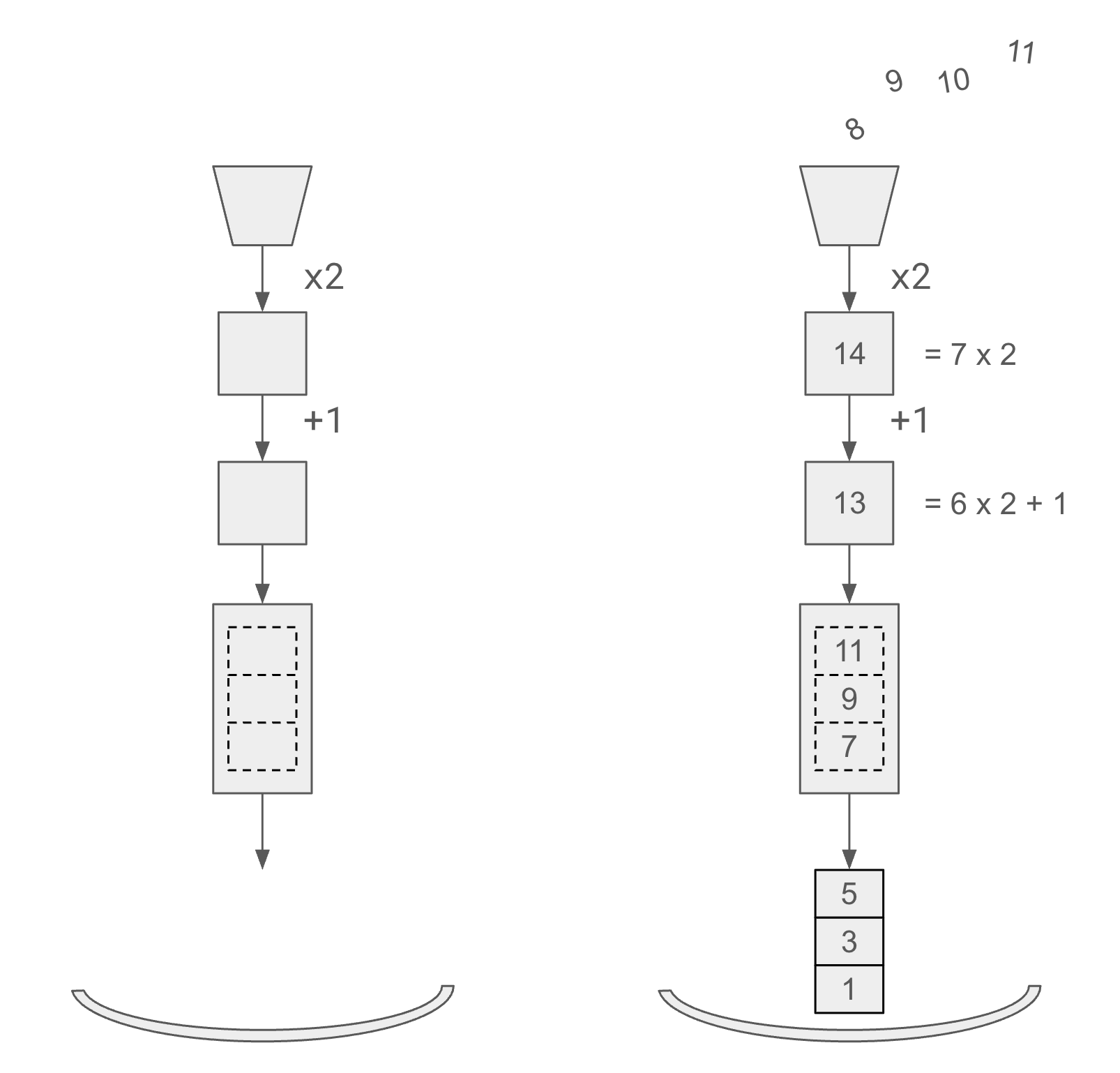
The following snippet demonstrates how one can construct a
Pipeline object using a PipelineBuilder object.
>>> from spdl.pipeline import PipelineBuilder
>>>
>>> pipeline = (
...     PipelineBuilder()
...     .add_source(range(12))
...     .pipe(lambda x: 2 * x)
...     .pipe(lambda x: x + 1)
...     .aggregate(3)
...     .add_sink(3)
...     .build(num_threads=1)
... )
The resulting Pipeline object contains all the logic to
perform the operations in an async event loop in a background thread.
Running a Pipeline
Note
The v0.4.0 introduced the experimental automatic start and stop.
The Pipeline.get_item() method ensures that the background
thread is started, and the Pipeline.stop() method is called
when the Pipeline object is garbage collected.
You should be simply able to do for item in pipeline:.
Please file an issue if you find any problems with the automatic start
and stop.
If you need to control the resource usage, then you can explicitly call
start() and stop.
To run the pipeline, call Pipeline.start().
Once the pipeline starts executing, you can iterate on the pipeline.
Finally call Pipeline.stop() to stop the background thread.
>>> pipeline.start()
>>>
>>> for item in pipeline:
...     print(item)
[1, 3, 5]
[7, 9, 11]
[13, 15, 17]
[19, 21, 23]
>>> pipeline.stop()
Calling Pipeline.stop() promptly is good practice: it releases the
background thread and any worker processes as soon as you are done, instead of
leaving them running until the object is garbage collected. It is no longer
required to avoid a hang at exit, though — a Pipeline stops itself when it is
garbage collected, and Pipeline.start() additionally registers a hook
that stops any still-running pipeline at interpreter shutdown (see
Pipeline.start() for details).
In practice, there is always a possibility that the application is
interrupted for unexpected reasons.
To make sure that the pipeline is stopped, it is recommended to use
Pipeline.auto_stop() context manager, which calls
Pipeline.start and Pipeline.stop automatically.
>>> with pipeline.auto_stop():
...    for item in pipeline:
...        print(item)
Note
Once Pipeline.stop() method is called, the Pipeline object is unusable.
To pause the execution, simply stop consuming the output.
The Pipeline will get blocked when the internal buffers are full.
To resume the execution, resume consuming the data.
⚠ Caveats ⚠
Unlike processes, threads cannot be killed.
The Pipeline object uses a thread pool, which must be shut down properly.
The library cleans a Pipeline up automatically (see below), so these
patterns no longer hang the interpreter at exit. They can still keep the
background thread and worker processes alive longer than necessary, so they are
worth avoiding for prompt resource release.
Holding a reference to a Pipeline
A Pipeline cleans itself up automatically, so holding a reference to one
is safe. When the object is garbage collected, a weakref.finalize drains
and stops its background thread — and any worker processes or subinterpreters
it spawned — even if you never called Pipeline.stop(). And if a
reference survives until the program ends, Pipeline.start() has
registered a hook that stops any still-running pipeline at the very start of
interpreter finalization, so the process does not hang at exit (see
Pipeline.start() for how that ordering works). Holding a reference is
in fact required to re-iterate a continuous=True source across epochs:
the same Pipeline must stay alive to be iterated again.
You should still release the reference (or call Pipeline.stop()) once
you are done, so the worker processes and memory are freed promptly rather than
lingering until GC — but this is resource hygiene, not a requirement to avoid a
hang.
class DataLoader:
    def __init__(self) -> None:
        # Safe (and, for a continuous source, required) to keep the
        # pipeline as an attribute so it is reused across epochs.
        self._pipeline = self.get_pipeline(...)

    def __iter__(self) -> Iterator[T]:
        yield from self._pipeline.get_iterator(...)

    def close(self) -> None:
        # Optional: drop the reference when done so the pipeline's
        # resources are freed promptly instead of at GC / interpreter exit.
        self._pipeline = None
Some frameworks stash the dataloader on a long-lived object.
TorchTNT, for example, keeps a strong reference
to the dataloader on its State (PhaseState._dataloader) until the
process exits. This no longer hangs the run — the shutdown hook cleans the
pipeline up at exit — but if you want its worker processes and memory released
as soon as training ends (e.g. between fit and eval) rather than at exit, you
can clear those references and force a collection with a callback:
import gc

from torchtnt.framework.callback import Callback
from torchtnt.framework.state import State
from torchtnt.framework.unit import TEvalUnit, TPredictUnit, TTestUnit, TTrainUnit


class DetachDataloaderCallback(Callback):
    """Optional: drop TNT's dataloader references at the end of training so
    the SPDL ``Pipeline`` (and its workers) are released promptly, instead of
    lingering on ``State`` until the pipeline is cleaned up at exit."""

    def on_train_end(self, state: State, unit: TTrainUnit) -> None:
        self._detach(state)

    def on_exception(
        self,
        state: State,
        unit: TTrainUnit | TEvalUnit | TPredictUnit | TTestUnit,
        exc: BaseException,
    ) -> None:
        # on_train_end does not fire on failure/preemption, so reap here too.
        self._detach(state)

    def _detach(self, state: State) -> None:
        for phase_state in (state.train_state, state.eval_state):
            if phase_state is not None:
                phase_state._dataloader = None  # pyre-ignore[8]
        gc.collect()
Calling iter on Pipeline
Prefer not to call the iter() function on a Pipeline object and
keep the resulting iterator around. Doing so delays Pipeline.stop()
until the iterator is collected, keeping the background thread and worker
processes running longer than necessary. (It will not hang the interpreter at
exit — the hook registered by Pipeline.start() covers that — but it
holds resources needlessly.)
Say you wrap a Pipeline to create a class that resembles conventional
DataLoader.
class DataLoader(Iterable[T]):
    ...

    def __iter__(self) -> Iterator[T]:
        pipeline = self.get_pipeline()
        for item in pipeline:
            yield item

dataloader = DataLoader(...)
When using this instance, make sure to not leave the iterator object hanging around. That is, the usual for-loop is good.
# 👍 The iterator is garbage collected soon after the for-loop.
for item in dataloader:
    ...
# the pipeline will be shutdown at the end of the for-loop.
This way, the context manager properly calls Pipeline.stop when
the execution flow goes out of the loop, even
when the application is exiting with unexpected errors.
The following code snippet shows an anti-pattern where the iterator object is assigned to a variable, which delays the shutdown of the thread pool.
# 🚫 Do not keep the iterator object around
ite = iter(dataloader)
item = next(ite)
# the pipeline won't be shutdown until the `ite` variable
# goes out of scope. When does that happen??
Until then, Pipeline.stop is deferred to whenever the garbage collector
deletes the object, so the background thread and workers keep holding
resources longer than needed.