Accessories and Fitment Guide
Aria Welcome Kit Contents
-
Case: Safely stores your Aria glasses and accessories for transport.
-
Microfiber Lens Cloth: Use this cloth to gently clean and dry your Aria glasses. (Note: The glasses are not waterproof.) Lens cleaning wipes are also suitable.
-
Quick Start Guide: Provides essential information about the device and Companion App. Full details are also available on our wiki.
-
Accessories Guide: Explains all included accessories and their usage.
-
Regulatory Insert: Contains compliance and safety information.
-
Circle and Wedge Fitment Accessories: These help improve comfort and prevent slippage. For application instructions, refer to the Accessories Guide.
For more details, please consult the included guides or contact our Support team.
Fitment Guide
Aria Gen 2 comes in eight sizes to ensure users have an optimal physical and functional fit — accounting for a number of human factors including head breadth and nose bridge variation.
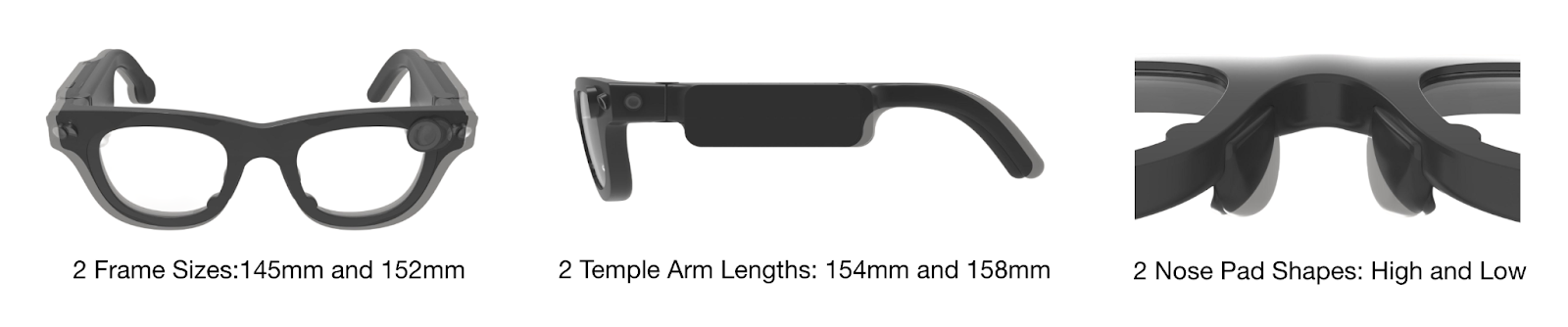
A proper fit means users can wear the glasses for longer periods of time more comfortably, and so that the sensors function optimally over that duration. The glasses' nose pads must make contact with the wearer's nose bridge for the PPG, contact microphone, and eye tracking cameras to work correctly. The functionality of the eye tracking cameras can be impacted by the angle and distance of the camera to the face.
Ways to Determine Your Size
Today, there are three primary methods of determining a user's best fit.
| Style | Time | Use Case | Benefits | Limitations |
|---|---|---|---|---|
| Moderated Fitment | 5-10 minutes for participant and moderator | Used by researchers to scale fitment efforts for large data collection efforts | The fastest and most direct way to size an individual. | Requires a set of 8 SKU sizes |
| Self-Service | 3-5 minutes | No moderator available. The user tries on available devices and chooses the best fit. | Removes friction and puts the end user into whatever pair of glasses is available. | May affect comfort and duration of use. Can lead to issues with ET, PPG, and Contact Mic. |
| Remote Fitment Kit | 15 minutes | Used to determine size for glasses that are to be worn by a single primary participant. | Easy to ship and reuse if multiple participants are in one location. | Requires a managed spreadsheet with results and the Aria team to ship the device (post-sizing). |
| AR Fitment | 1-2 minutes | Remote self-sizing via smartphone scan for individual partners and onboarding users. | Eliminates shipping delays and kit waiting times; provides instant, same-day size recommendations without an account. | Currently iOS/iPhone only; requires TestFlight installation. |
Moderated Fitment Instructions
Moderated fitment is when an operator guides users through a fitment flow. The same flow can be done without a moderator by an individual to achieve the same results.
Suggestion: Set up glasses by size in the following order prior to beginning fitment:
| NLL (narrow/long/low) | WLL (wide/long/low) |
| NSL (narrow/short/low) | WSL (wide/short/low) |
| NLH (narrow/long/high) | WLH (wide/long/high) |
| NSH (narrow/short/high) | WSH (wide/short/high) |
Step 1: Determine Nose Bridge Height
Identify the wearer's nose bridge height to determine the starting frame:
- Low Bridge: Start with WSL (Wide/Short/Low).
- Medium/High Bridge: Start with WSH (Wide/Short/High).
Step 2: Assess Stability
Evaluate each size by checking for discomfort and testing stability (nodding, shaking head, looking down). If instability persists, introduce the stability accessories (see below).
Iterate in this order:
- Nose Pads: Assess the initial size (WSL or WSH).
- Frame Width: Compare the Wide starter to its Narrow counterpart (NSL or NSH).
- Temple Length: Once width is preferred, test Long vs. Short arm variants within that width category.
Step 3: Finalize Choice
Continue comparing and contrasting as needed to identify the top 1-2 choices and add stability accessories to the top choice if needed.
AR Fitment Instructions
AR Fitment allows users to remotely scan their face using an iPhone to get an immediate, accurate Aria Gen 2 size recommendation. This eliminates the need to wait for a physical kit and enables same-day sizing.
Prerequisites
- iOS Device: An iPhone capable of running TestFlight.
- App Access: Aria Companion App installed via TestFlight.
- User Account: None required — sizing can be completed without logging in or creating an account.
Step-by-Step Instructions
-
Install the App. Download and install the Aria Companion App via TestFlight onto your iPhone, or scan the QR code below.

-
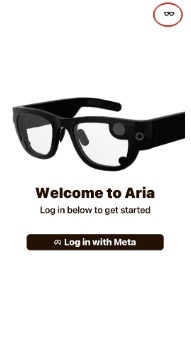
Launch Fitment. Open the Aria Companion App. On the Welcome screen, tap the glasses icon in the top-right corner to start AR Fitment. Do not tap "Log in with Meta."
-
Prepare and Scan. Remove glasses, hats, and jewelry, and pull your hair away from your face. Tap Start Face Scan and follow the on-screen prompts. When the scan finishes, the app shows your recommended size. Write it down.
-
Submit Your Size.
- Individual Users: Save your recommended size for ordering.
- Lab Coordinators / Groups: Enter each participant's email address alongside their recommended size into the onboarding form (up to 5 users per lab).
We use the email address to create each user's account, and the size to order the right device.
Lab coordinators: one person fills out the form for the whole lab. Have each team member who will use a device complete their own AR Fitment (Steps 1 and 2), then collect and enter every user's email address alongside their matching recommended size. Submitting all of them together gives Academic Relations everything needed to order devices and create accounts.
Android Users / Inconclusive Scans: AR Fitment is currently iOS-only. If you use an Android device or receive an inconclusive scan result, you can request a physical Remote Fitment Kit by emailing projectariapartners@meta.com.
Privacy: Only your numeric fitment measurements are kept. Raw face images and 3D mesh are not stored.
Prefer a physical fitment kit? If you use Android, or your scan is inconclusive, email projectariapartners@meta.com and we'll follow up.
Questions? Email projectariapartners@meta.com.
Remote Fitment Kit Instructions
The Aria Gen 2 Remote Fitment Kit empowers users to self-assess and submit info to calculate their optimal glasses size from eight available options. This kit uses a series of cardboard tools and a companion survey to guide users through a quick, accurate fitment process. The goal is to ensure glasses are comfortable, secure, and tailored to your unique facial features.
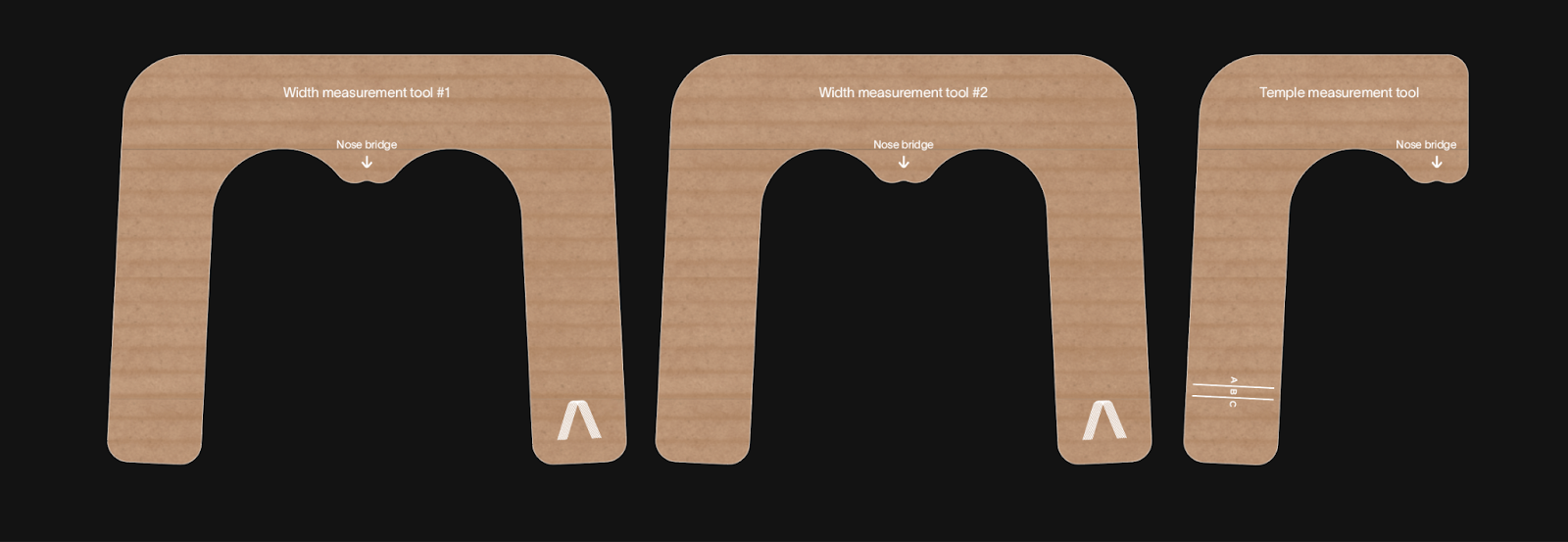
On the back of each Remote Fitment Kit there is a QR code that links to the Self-sizing Form. Scan the QR code to begin your session and submit your measurements.
Stability Accessories
Each pair of glasses comes with two types of stability accessories — the Circle and the Wedge — which can reduce slippage and improve overall stability and comfort. These accessories increase contact around the back of the ear and side of the head to improve the overall fit of the glasses.
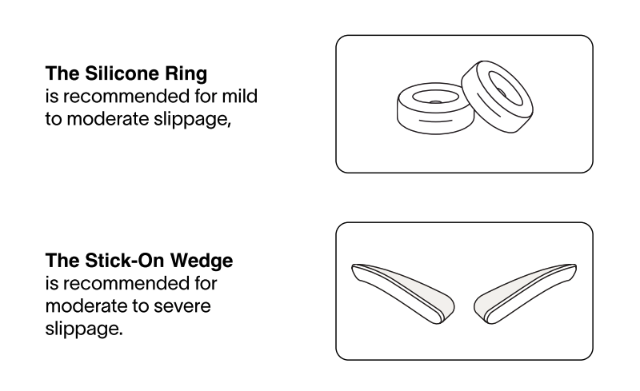
A printed guide on when and how to use each accessory is included in the provided cardboard box.
Self-Sizing Form
To determine your Aria size online, please follow the instructions and fill in your measurements in the form below: