Inverse kinematics with solver2
This example uses solver2 to move the left wrist of the
Momentum Human Rig (MHR) toward a
target while keeping the character's root fixed.
Load MHR and define a target
Download and extract the public MHR v1.0.1 asset archive:
mkdir -p /path/to/MHR
curl -L \
  https://github.com/facebookresearch/MHR/releases/download/v1.0.1/assets.zip \
  -o /path/to/MHR/assets.zip
unzip /path/to/MHR/assets.zip -d /path/to/MHR
export MHR_ASSET_DIR=/path/to/MHR/assets
The archive contains the matching files assets/lod1.fbx and
assets/compact_v6_1.model used below. The model definition supplies MHR's
pose parameterization; loading the FBX by itself would leave the parameter
transform empty.
import os
from pathlib import Path

import numpy as np
import pymomentum.geometry as pym_geometry
import pymomentum.solver2 as pym_solver

asset_dir = Path(os.environ["MHR_ASSET_DIR"])
fbx_path = asset_dir / "lod1.fbx"
model_path = asset_dir / "compact_v6_1.model"
character = pym_geometry.Character.load_fbx(
    fbx_filename=str(fbx_path),
    model_filename=str(model_path),
)

initial_parameters = np.zeros(
    character.parameter_transform.size,
    dtype=np.float32,
)
initial_state = pym_geometry.model_parameters_to_skeleton_state(
    character,
    initial_parameters,
)
initial_positions = initial_state[:, :3]

wrist_joint = character.skeleton.joint_index("l_wrist")
arm_joints = [
    character.skeleton.joint_index(name)
    for name in ("l_clavicle", "l_uparm", "l_lowarm")
]
body_height = np.ptp(initial_positions[:, 1])
target = initial_positions[wrist_joint] + body_height * np.array(
    [0.0, 0.12, 0.10],
    dtype=np.float32,
)
Build and run the solver
The wrist constraint pulls the hand toward the target. Only the left-arm parameters are enabled below, which pins the root and leaves the rest of the character unchanged. MHR includes joint limits, so a limit term helps keep the result plausible.
position_error = pym_solver.PositionErrorFunction(character)
position_error.add_constraint(
    parent=wrist_joint,
    target=target,
    weight=1.0,
)

solver_function = pym_solver.SkeletonSolverFunction(
    character,
    [
        position_error,
        pym_solver.LimitErrorFunction(character, weight=0.1),
    ],
)
options = pym_solver.GaussNewtonSolverOptions()
options.max_iterations = 50
options.regularization = 1e-3
options.do_line_search = True

solver = pym_solver.GaussNewtonSolver(solver_function, options)
enabled_parameters = character.parameter_transform.parameters_for_joints(
    arm_joints
)
enabled_parameters &= character.parameter_transform.pose_parameters
solver.set_enabled_parameters(enabled_parameters)
solved_parameters = solver.solve(initial_parameters)

solved_state = pym_geometry.model_parameters_to_skeleton_state(
    character,
    solved_parameters,
)
solved_positions = solved_state[:, :3]
print("target error:", np.linalg.norm(solved_positions[wrist_joint] - target))
print("iteration errors:", solver.per_iteration_errors)
For a different task, use find_parameters(...) or
parameters_for_joints(...) to construct the appropriate mask.
Result
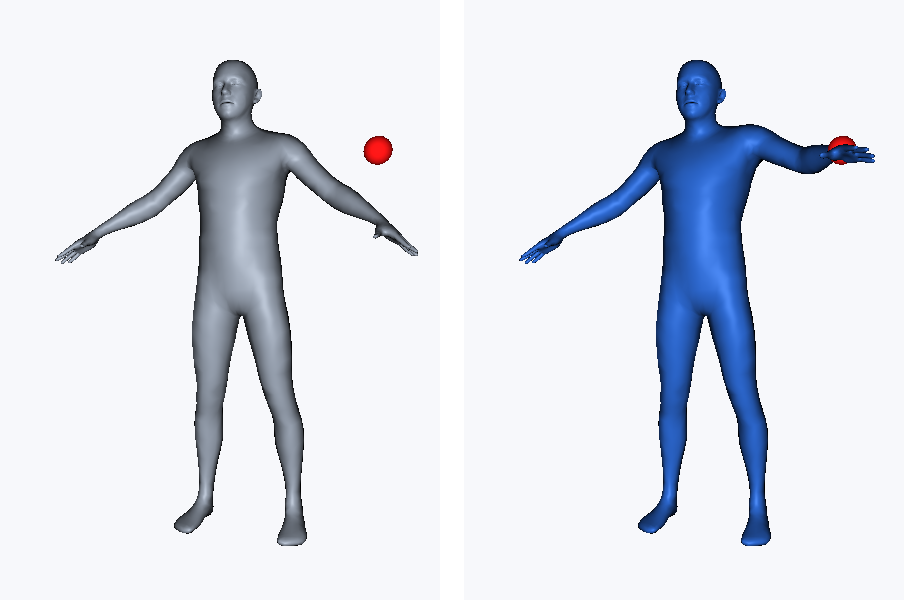
The initial pose is shown on the left and the solved pose on the right; the red sphere marks the target in both panels. See Visualizing results for the rasterizer and other visualization options.
If the solver does not produce the expected pose, inspect target error and
per_iteration_errors first. Then check that the target is reachable, the
required parameters are enabled, and competing error-function weights are on
similar scales.
For multiple constraints, prefer PositionErrorFunction.add_constraints(...)
over a Python loop. See the solver2 API reference
for orientation, projection, collision, and sequence error functions. The
public MHR tests
cover the model assets, while the public
solver2 tests
provide maintained examples of the solver and its constraints.