Benchmark tarfile
Benchmark script for spdl.io.iter_tarfile() function.
This script benchmarks the performance of iter_tarfile() against
Python’s built-in tarfile module using multi-threading.
Two types of inputs are tested for iter_tarfile().
Byte string and a file-like object returns byte string by chunk.
The benchmark:
Creates test tar archives with various numbers of files
Runs both implementations with different thread counts
Measures queries per second (QPS) for each configuration
Plots the results comparing the three implementations
Example
$ numactl --membind 0 --cpubind 0 python benchmark_tarfile.py --output results.csv
# Plot results
$ python benchmark_tarfile_plot.py --input results.csv --output wav_benchmark_plot.png
# Plot results without load_wav
$ python benchmark_tarfile_plot.py --input results.csv --output wav_benchmark_plot_2.png \
  --filter '4. SPDL iter_tarfile (bytes w/o convert)'
Result
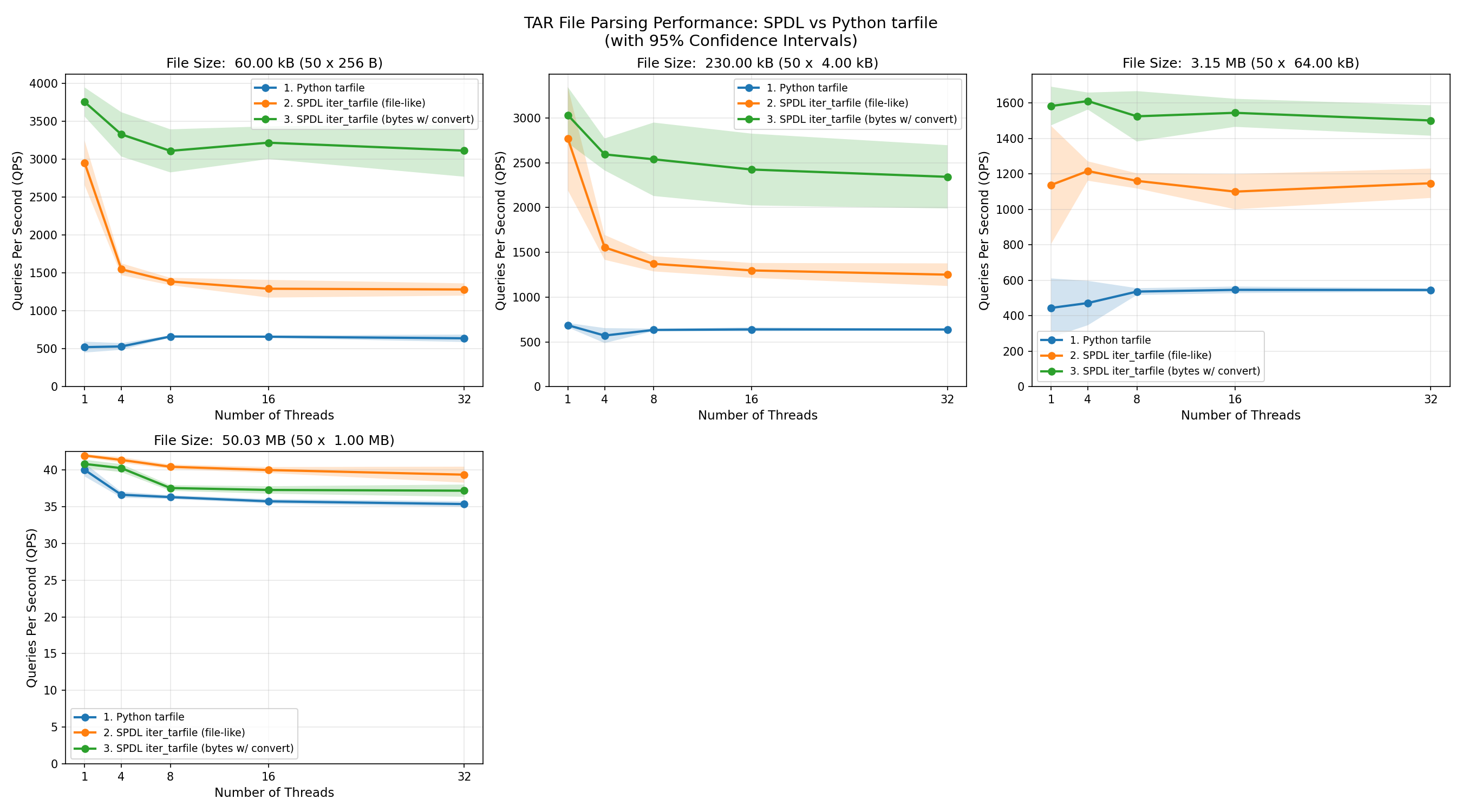
The following plot shows the QPS (measured by the number of files processed) of each functions with different file size.
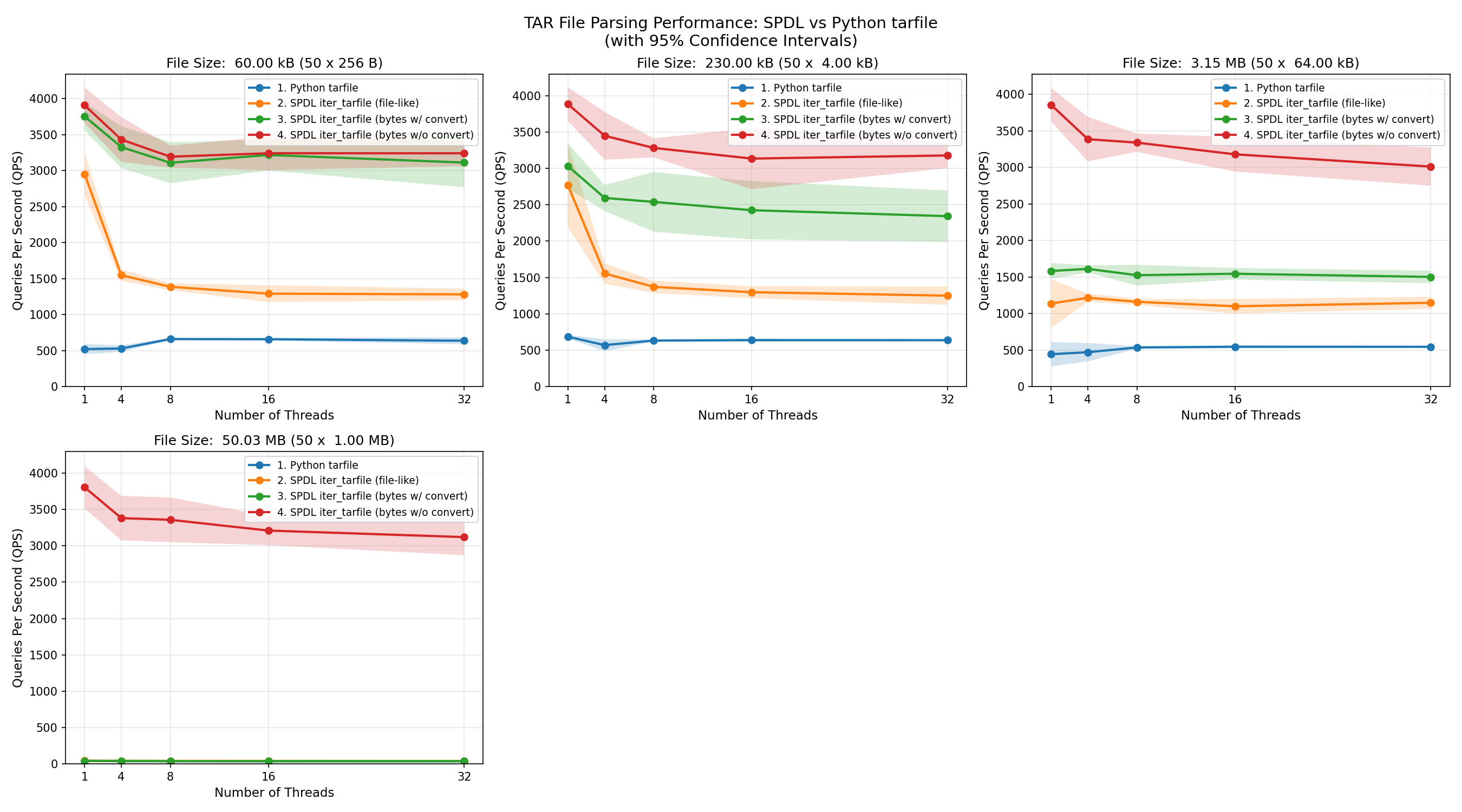
The spdl.io.iter_tarfile() function processes data fastest when the input is a byte
string.
Its performance is consistent across different file sizes.
This is because, when the entire TAR file is loaded into memory as a contiguous array,
the function only needs to read the header and return the address of the corresponding data
(note that iter_tarfile() returns a memory view when the input is a byte
string).
Since reading the header is very fast, most of the time is spent creating memory view objects
while holding the GIL (Global Interpreter Lock).
As a result, the speed of loading files decreases as more threads are used.
When the input data type is switched from a byte string to a file-like object,
the performance of spdl.io.iter_tarfile() is also affected by the size of
the input data.
This is because data is processed incrementally, and for each file in the TAR archive,
a new byte string object is created.
The implementation tries to request the exact amount of bytes needed, but file-like objects
do not guarantee that they return the requested length,
instead, they return at most the requested number of bytes.
Therefore, many intermediate byte string objects must be created.
As the file size grows, it takes longer to process the data.
Since the GIL must be locked while byte strings are created,
performance degrades as more threads are used.
At some point, the performance becomes similar to Python’s built-in tarfile module,
which is a pure-Python implementation and thus holds the GIL almost entirely.
Source
Source
Click here to see the source.
  1#!/usr/bin/env python3
  2# Copyright (c) Meta Platforms, Inc. and affiliates.
  3# All rights reserved.
  4#
  5# This source code is licensed under the BSD-style license found in the
  6# LICENSE file in the root directory of this source tree.
  7
  8# pyre-strict
  9
 10"""Benchmark script for :py:func:`spdl.io.iter_tarfile` function.
 11
 12This script benchmarks the performance of :py:func:`~spdl.io.iter_tarfile` against
 13Python's built-in :py:mod:`tarfile` module using multi-threading.
 14Two types of inputs are tested for :py:func:`~spdl.io.iter_tarfile`.
 15Byte string and a file-like object returns byte string by chunk.
 16
 17The benchmark:
 18
 191. Creates test tar archives with various numbers of files
 202. Runs both implementations with different thread counts
 213. Measures queries per second (QPS) for each configuration
 224. Plots the results comparing the three implementations
 23
 24**Example**
 25
 26.. code-block:: shell
 27
 28   $ numactl --membind 0 --cpubind 0 python benchmark_tarfile.py --output results.csv
 29   # Plot results
 30   $ python benchmark_tarfile_plot.py --input results.csv --output wav_benchmark_plot.png
 31   # Plot results without load_wav
 32   $ python benchmark_tarfile_plot.py --input results.csv --output wav_benchmark_plot_2.png \\
 33     --filter '4. SPDL iter_tarfile (bytes w/o convert)'
 34
 35**Result**
 36
 37The following plot shows the QPS (measured by the number of files processed) of each
 38functions with different file size.
 39
 40.. image:: ../../_static/data/example_benchmark_tarfile.png
 41
 42.. image:: ../../_static/data/example_benchmark_tarfile_2.png
 43
 44The :py:func:`spdl.io.iter_tarfile` function processes data fastest when the input is a byte
 45string.
 46Its performance is consistent across different file sizes.
 47This is because, when the entire TAR file is loaded into memory as a contiguous array,
 48the function only needs to read the header and return the address of the corresponding data
 49(note that :py:func:`~spdl.io.iter_tarfile` returns a memory view when the input is a byte
 50string).
 51Since reading the header is very fast, most of the time is spent creating memory view objects
 52while holding the GIL (Global Interpreter Lock).
 53As a result, the speed of loading files decreases as more threads are used.
 54
 55When the input data type is switched from a byte string to a file-like object,
 56the performance of :py:func:`spdl.io.iter_tarfile` is also affected by the size of
 57the input data.
 58This is because data is processed incrementally, and for each file in the TAR archive,
 59a new byte string object is created.
 60The implementation tries to request the exact amount of bytes needed, but file-like objects
 61do not guarantee that they return the requested length,
 62instead, they return at most the requested number of bytes.
 63Therefore, many intermediate byte string objects must be created.
 64As the file size grows, it takes longer to process the data.
 65Since the GIL must be locked while byte strings are created,
 66performance degrades as more threads are used.
 67At some point, the performance becomes similar to Python's built-in ``tarfile`` module,
 68which is a pure-Python implementation and thus holds the GIL almost entirely.
 69"""
 70
 71__all__ = [
 72    "BenchmarkConfig",
 73    "create_test_tar",
 74    "iter_tarfile_builtin",
 75    "main",
 76    "process_tar_builtin",
 77    "process_tar_spdl",
 78    "process_tar_spdl_filelike",
 79]
 80
 81import argparse
 82import io
 83import os
 84import tarfile
 85from collections.abc import Callable, Iterator
 86from dataclasses import dataclass
 87from functools import partial
 88
 89import spdl.io
 90
 91try:
 92    from examples.benchmark_utils import (  # pyre-ignore[21]
 93        BenchmarkResult,
 94        BenchmarkRunner,
 95        ExecutorType,
 96        get_default_result_path,
 97        save_results_to_csv,
 98    )
 99except ImportError:
100    from spdl.examples.benchmark_utils import (
101        BenchmarkResult,
102        BenchmarkRunner,
103        ExecutorType,
104        get_default_result_path,
105        save_results_to_csv,
106    )
107
108
109DEFAULT_RESULT_PATH: str = get_default_result_path(__file__)
110
111
112@dataclass
113class BenchmarkConfig:
114    """BenchmarkConfig()
115
116    Configuration for a single TAR benchmark run."""
117
118    function_name: str
119    """Name of the function being tested"""
120
121    tar_size: int
122    """Total size of the TAR archive in bytes"""
123
124    file_size: int
125    """Size of each file in the TAR archive in bytes"""
126
127    num_files: int
128    """Number of files in the TAR archive"""
129
130    num_threads: int
131    """Number of concurrent threads"""
132
133    num_iterations: int
134    """Number of iterations per run"""
135
136    total_files_processed: int
137    """Total number of files processed across all iterations"""
138
139
140def iter_tarfile_builtin(tar_data: bytes) -> Iterator[tuple[str, bytes]]:
141    """Iterate over TAR file using Python's built-in ``tarfile`` module.
142
143    Args:
144        tar_data: TAR archive as bytes.
145
146    Yields:
147        Tuple of ``(filename, content)`` for each file in the archive.
148    """
149    with tarfile.open(fileobj=io.BytesIO(tar_data), mode="r") as tar:
150        for member in tar.getmembers():
151            if member.isfile():
152                file_obj = tar.extractfile(member)
153                if file_obj:
154                    content = file_obj.read()
155                    yield member.name, content
156
157
158def process_tar_spdl(tar_data: bytes, convert: bool) -> int:
159    """Process TAR archive using :py:func:`spdl.io.iter_tarfile`.
160
161    Args:
162        tar_data: TAR archive as bytes.
163
164    Returns:
165        Number of files processed.
166    """
167    count = 0
168    if convert:
169        for _, content in spdl.io.iter_tarfile(tar_data):
170            bytes(content)
171            count += 1
172        return count
173    else:
174        for _ in spdl.io.iter_tarfile(tar_data):
175            count += 1
176        return count
177
178
179def process_tar_builtin(tar_data: bytes) -> int:
180    """Process TAR archive using Python's built-in ``tarfile`` module.
181
182    Args:
183        tar_data: TAR archive as bytes.
184
185    Returns:
186        Number of files processed.
187    """
188    count = 0
189    for _ in iter_tarfile_builtin(tar_data):
190        count += 1
191    return count
192
193
194def process_tar_spdl_filelike(tar_data: bytes) -> int:
195    """Process TAR archive using :py:func:`spdl.io.iter_tarfile` with file-like object.
196
197    Args:
198        tar_data: TAR archive as bytes.
199
200    Returns:
201        Number of files processed.
202    """
203    count = 0
204    file_like = io.BytesIO(tar_data)
205    for _ in spdl.io.iter_tarfile(file_like):  # pyre-ignore[6]
206        count += 1
207    return count
208
209
210def _size_str(n: int) -> str:
211    if n < 1024:
212        return f"{n} B"
213    if n < 1024 * 1024:
214        return f"{n / 1024: .2f} kB"
215    if n < 1024 * 1024 * 1024:
216        return f"{n / (1024 * 1024): .2f} MB"
217    return f"{n / (1024 * 1024 * 1024): .2f} GB"
218
219
220def create_test_tar(num_files: int, file_size: int) -> bytes:
221    """Create a TAR archive in memory with specified number of files.
222
223    Args:
224        num_files: Number of files to include in the archive.
225        file_size: Size of each file in bytes.
226
227    Returns:
228        TAR archive as bytes.
229    """
230    tar_buffer = io.BytesIO()
231    with tarfile.open(fileobj=tar_buffer, mode="w") as tar:
232        for i in range(num_files):
233            filename = f"file_{i:06d}.txt"
234            content = b"1" * file_size
235            info = tarfile.TarInfo(name=filename)
236            info.size = len(content)
237            tar.addfile(info, io.BytesIO(content))
238    tar_buffer.seek(0)
239    return tar_buffer.getvalue()
240
241
242def _parse_args() -> argparse.Namespace:
243    """Parse command line arguments.
244
245    Returns:
246        Parsed arguments.
247    """
248    parser = argparse.ArgumentParser(
249        description="Benchmark iter_tarfile performance with multi-threading"
250    )
251    parser.add_argument(
252        "--num-files",
253        type=int,
254        default=100,
255        help="Number of files in the test TAR archive",
256    )
257    parser.add_argument(
258        "--num-iterations",
259        type=int,
260        default=100,
261        help="Number of iterations for each thread count",
262    )
263    parser.add_argument(
264        "--output",
265        type=lambda p: os.path.realpath(p),
266        default=DEFAULT_RESULT_PATH,
267        help="Output path for the results",
268    )
269
270    return parser.parse_args()
271
272
273def main() -> None:
274    """Main entry point for the benchmark script.
275
276    Parses command-line arguments, runs benchmarks, and generates plots.
277    """
278
279    args = _parse_args()
280
281    # Define explicit configuration lists
282    thread_counts = [1, 4, 8, 16, 32]
283    file_sizes = [2**8, 2**12, 2**16, 2**20]
284
285    # Define benchmark function configurations
286    # (function_name, function)
287    benchmark_functions: list[tuple[str, Callable[[bytes], int]]] = [
288        ("1. Python tarfile", process_tar_builtin),
289        ("2. SPDL iter_tarfile (file-like)", process_tar_spdl_filelike),
290        (
291            "3. SPDL iter_tarfile (bytes w/ convert)",
292            partial(process_tar_spdl, convert=True),
293        ),
294        (
295            "4. SPDL iter_tarfile (bytes w/o convert)",
296            partial(process_tar_spdl, convert=False),
297        ),
298    ]
299
300    print("Starting benchmark with configuration:")
301    print(f"  Number of files: {args.num_files}")
302    print(f"  File sizes: {file_sizes} bytes")
303    print(f"  Iterations per thread count: {args.num_iterations}")
304    print(f"  Thread counts: {thread_counts}")
305
306    results: list[BenchmarkResult[BenchmarkConfig]] = []
307    num_runs = 5
308
309    for num_threads in thread_counts:
310        with BenchmarkRunner(
311            executor_type=ExecutorType.THREAD,
312            num_workers=num_threads,
313            warmup_iterations=10 * num_threads,
314        ) as runner:
315            for file_size in file_sizes:
316                tar_data = create_test_tar(args.num_files, file_size)
317                for func_name, func in benchmark_functions:
318                    print(
319                        f"TAR size: {_size_str(len(tar_data))} "
320                        f"({args.num_files} x {_size_str(file_size)}), "
321                        f"'{func_name}', {num_threads} threads"
322                    )
323
324                    total_files_processed = args.num_files * args.num_iterations
325
326                    config = BenchmarkConfig(
327                        function_name=func_name,
328                        tar_size=len(tar_data),
329                        file_size=file_size,
330                        num_files=args.num_files,
331                        num_threads=num_threads,
332                        num_iterations=args.num_iterations,
333                        total_files_processed=total_files_processed,
334                    )
335
336                    result, _ = runner.run(
337                        config,
338                        partial(func, tar_data),
339                        args.num_iterations,
340                        num_runs=num_runs,
341                    )
342
343                    margin = (result.ci_upper - result.ci_lower) / 2
344                    print(
345                        f"  QPS: {result.qps:8.2f} ± {margin:.2f}  "
346                        f"({result.ci_lower:.2f}-{result.ci_upper:.2f}, "
347                        f"{num_runs} runs, {total_files_processed} files)"
348                    )
349
350                    results.append(result)
351
352    # Save results to CSV
353    save_results_to_csv(results, args.output)
354
355    print(
356        f"Benchmark complete. To generate plots, run: "
357        f"python benchmark_tarfile_plot.py --input {args.output} "
358        f"--output {args.output.replace('.csv', '.png')}"
359    )
360
361
362if __name__ == "__main__":
363    main()
API Reference
Functions
- create_test_tar(num_files: int, file_size: int) bytes[source]
Create a TAR archive in memory with specified number of files.
- Parameters:
num_files – Number of files to include in the archive.
file_size – Size of each file in bytes.
- Returns:
TAR archive as bytes.
- iter_tarfile_builtin(tar_data: bytes) Iterator[tuple[str, bytes]][source]
Iterate over TAR file using Python’s built-in
tarfilemodule.- Parameters:
tar_data – TAR archive as bytes.
- Yields:
Tuple of
(filename, content)for each file in the archive.
- main() None[source]
Main entry point for the benchmark script.
Parses command-line arguments, runs benchmarks, and generates plots.
- process_tar_builtin(tar_data: bytes) int[source]
Process TAR archive using Python’s built-in
tarfilemodule.- Parameters:
tar_data – TAR archive as bytes.
- Returns:
Number of files processed.
- process_tar_spdl(tar_data: bytes, convert: bool) int[source]
Process TAR archive using
spdl.io.iter_tarfile().- Parameters:
tar_data – TAR archive as bytes.
- Returns:
Number of files processed.
- process_tar_spdl_filelike(tar_data: bytes) int[source]
Process TAR archive using
spdl.io.iter_tarfile()with file-like object.- Parameters:
tar_data – TAR archive as bytes.
- Returns:
Number of files processed.
Classes