Benchmark tarfile
Benchmark script for spdl.io.iter_tarfile() function.
This script benchmarks the performance of iter_tarfile() against
Python’s built-in tarfile module using multi-threading.
Two types of inputs are tested for iter_tarfile().
Byte string and a file-like object returns byte string by chunk.
The benchmark:
Creates test tar archives with various numbers of files
Runs both implementations with different thread counts
Measures queries per second (QPS) for each configuration
Plots the results comparing the three implementations
Example
$ numactl --membind 0 --cpubind 0 python benchmark_tarfile.py --output results.csv
# Plot results
$ python benchmark_tarfile_plot.py --input results.csv --output wav_benchmark_plot.png
# Plot results without load_wav
$ python benchmark_tarfile_plot.py --input results.csv --output wav_benchmark_plot_2.png \
  --filter '4. SPDL iter_tarfile (bytes w/o convert)'
Result
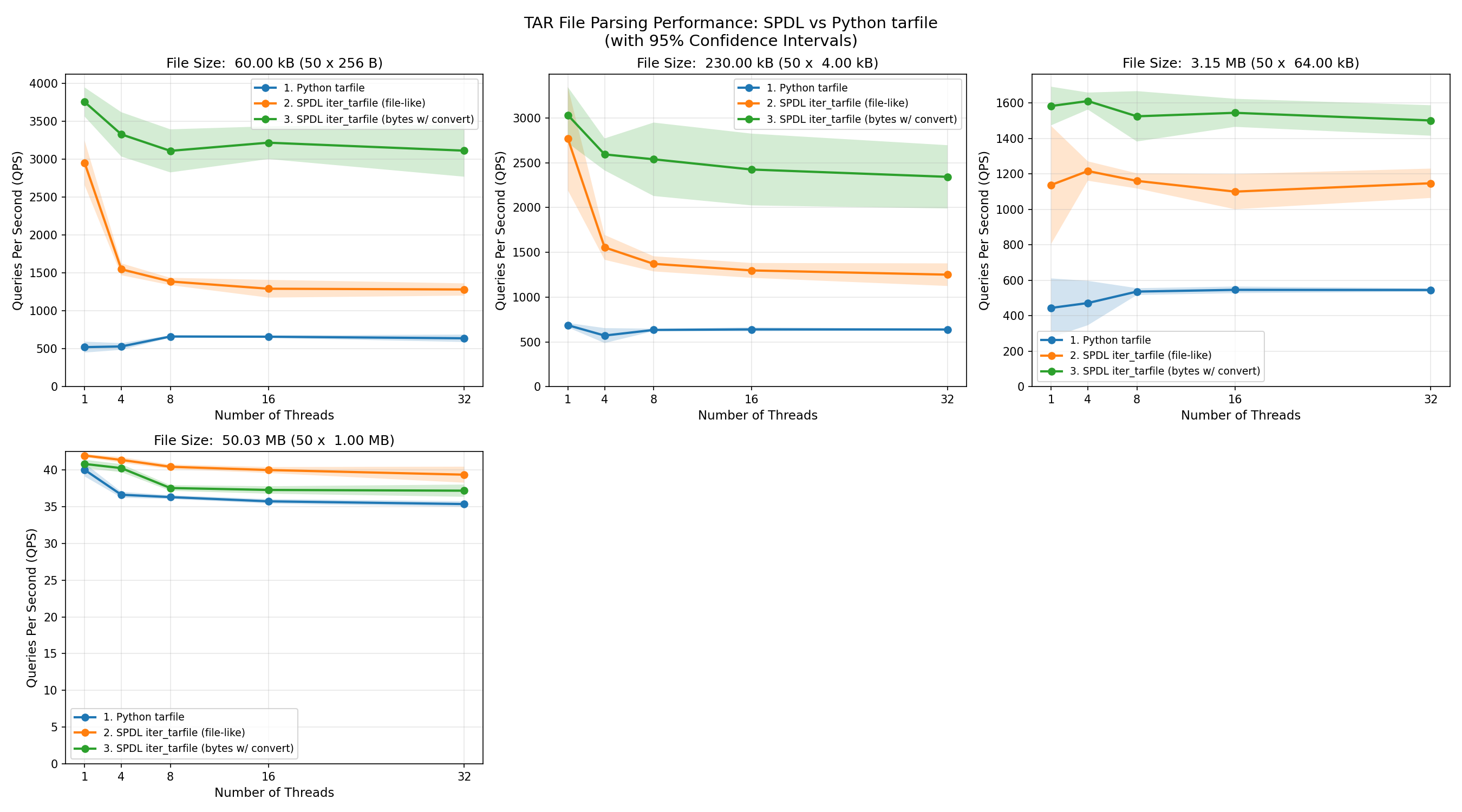
The following plot shows the QPS (measured by the number of files processed) of each functions with different file size.
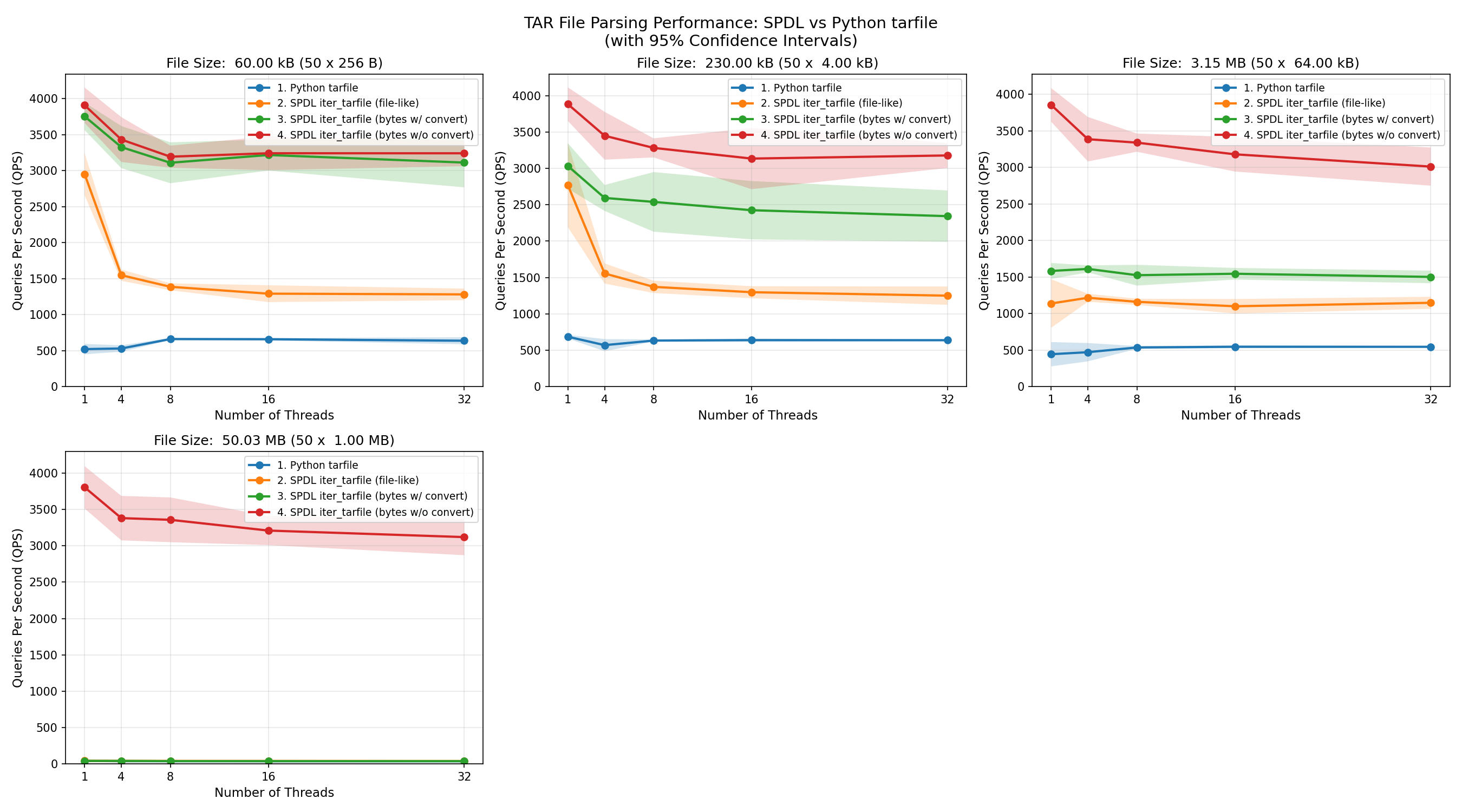
The spdl.io.iter_tarfile() function processes data fastest when the input is a byte
string.
Its performance is consistent across different file sizes.
This is because, when the entire TAR file is loaded into memory as a contiguous array,
the function only needs to read the header and return the address of the corresponding data
(note that iter_tarfile() returns a memory view when the input is a byte
string).
Since reading the header is very fast, most of the time is spent creating memory view objects
while holding the GIL (Global Interpreter Lock).
As a result, the speed of loading files decreases as more threads are used.
When the input data type is switched from a byte string to a file-like object,
the performance of spdl.io.iter_tarfile() is also affected by the size of
the input data.
This is because data is processed incrementally, and for each file in the TAR archive,
a new byte string object is created.
The implementation tries to request the exact amount of bytes needed, but file-like objects
do not guarantee that they return the requested length,
instead, they return at most the requested number of bytes.
Therefore, many intermediate byte string objects must be created.
As the file size grows, it takes longer to process the data.
Since the GIL must be locked while byte strings are created,
performance degrades as more threads are used.
At some point, the performance becomes similar to Python’s built-in tarfile module,
which is a pure-Python implementation and thus holds the GIL almost entirely.
Source
Source
Click here to see the source.
  1#!/usr/bin/env python3
  2# Copyright (c) Meta Platforms, Inc. and affiliates.
  3# All rights reserved.
  4#
  5# This source code is licensed under the BSD-style license found in the
  6# LICENSE file in the root directory of this source tree.
  7
  8
  9"""Benchmark script for :py:func:`spdl.io.iter_tarfile` function.
 10
 11This script benchmarks the performance of :py:func:`~spdl.io.iter_tarfile` against
 12Python's built-in :py:mod:`tarfile` module using multi-threading.
 13Two types of inputs are tested for :py:func:`~spdl.io.iter_tarfile`.
 14Byte string and a file-like object returns byte string by chunk.
 15
 16The benchmark:
 17
 181. Creates test tar archives with various numbers of files
 192. Runs both implementations with different thread counts
 203. Measures queries per second (QPS) for each configuration
 214. Plots the results comparing the three implementations
 22
 23**Example**
 24
 25.. code-block:: shell
 26
 27   $ numactl --membind 0 --cpubind 0 python benchmark_tarfile.py --output results.csv
 28   # Plot results
 29   $ python benchmark_tarfile_plot.py --input results.csv --output wav_benchmark_plot.png
 30   # Plot results without load_wav
 31   $ python benchmark_tarfile_plot.py --input results.csv --output wav_benchmark_plot_2.png \\
 32     --filter '4. SPDL iter_tarfile (bytes w/o convert)'
 33
 34**Result**
 35
 36The following plot shows the QPS (measured by the number of files processed) of each
 37functions with different file size.
 38
 39.. image:: ../../_static/data/example_benchmark_tarfile.png
 40
 41.. image:: ../../_static/data/example_benchmark_tarfile_2.png
 42
 43The :py:func:`spdl.io.iter_tarfile` function processes data fastest when the input is a byte
 44string.
 45Its performance is consistent across different file sizes.
 46This is because, when the entire TAR file is loaded into memory as a contiguous array,
 47the function only needs to read the header and return the address of the corresponding data
 48(note that :py:func:`~spdl.io.iter_tarfile` returns a memory view when the input is a byte
 49string).
 50Since reading the header is very fast, most of the time is spent creating memory view objects
 51while holding the GIL (Global Interpreter Lock).
 52As a result, the speed of loading files decreases as more threads are used.
 53
 54When the input data type is switched from a byte string to a file-like object,
 55the performance of :py:func:`spdl.io.iter_tarfile` is also affected by the size of
 56the input data.
 57This is because data is processed incrementally, and for each file in the TAR archive,
 58a new byte string object is created.
 59The implementation tries to request the exact amount of bytes needed, but file-like objects
 60do not guarantee that they return the requested length,
 61instead, they return at most the requested number of bytes.
 62Therefore, many intermediate byte string objects must be created.
 63As the file size grows, it takes longer to process the data.
 64Since the GIL must be locked while byte strings are created,
 65performance degrades as more threads are used.
 66At some point, the performance becomes similar to Python's built-in ``tarfile`` module,
 67which is a pure-Python implementation and thus holds the GIL almost entirely.
 68"""
 69
 70__all__ = [
 71    "BenchmarkConfig",
 72    "create_test_tar",
 73    "iter_tarfile_builtin",
 74    "main",
 75    "process_tar_builtin",
 76    "process_tar_spdl",
 77    "process_tar_spdl_filelike",
 78]
 79
 80import argparse
 81import io
 82import os
 83import tarfile
 84from collections.abc import Callable, Iterator
 85from dataclasses import dataclass
 86from functools import partial
 87
 88import spdl.io
 89
 90try:
 91    from examples.benchmark_utils import (  # pyre-ignore[21]
 92        BenchmarkResult,
 93        BenchmarkRunner,
 94        ExecutorType,
 95        get_default_result_path,
 96        save_results_to_csv,
 97    )
 98except ImportError:
 99    from spdl.examples.benchmark_utils import (
100        BenchmarkResult,
101        BenchmarkRunner,
102        ExecutorType,
103        get_default_result_path,
104        save_results_to_csv,
105    )
106
107
108DEFAULT_RESULT_PATH: str = get_default_result_path(__file__)
109
110
111@dataclass
112class BenchmarkConfig:
113    """BenchmarkConfig()
114
115    Configuration for a single TAR benchmark run."""
116
117    function_name: str
118    """Name of the function being tested"""
119
120    tar_size: int
121    """Total size of the TAR archive in bytes"""
122
123    file_size: int
124    """Size of each file in the TAR archive in bytes"""
125
126    num_files: int
127    """Number of files in the TAR archive"""
128
129    num_threads: int
130    """Number of concurrent threads"""
131
132    num_iterations: int
133    """Number of iterations per run"""
134
135    total_files_processed: int
136    """Total number of files processed across all iterations"""
137
138
139def iter_tarfile_builtin(tar_data: bytes) -> Iterator[tuple[str, bytes]]:
140    """Iterate over TAR file using Python's built-in ``tarfile`` module.
141
142    Args:
143        tar_data: TAR archive as bytes.
144
145    Yields:
146        Tuple of ``(filename, content)`` for each file in the archive.
147    """
148    with tarfile.open(fileobj=io.BytesIO(tar_data), mode="r") as tar:
149        for member in tar.getmembers():
150            if member.isfile():
151                file_obj = tar.extractfile(member)
152                if file_obj:
153                    content = file_obj.read()
154                    yield member.name, content
155
156
157def process_tar_spdl(tar_data: bytes, convert: bool) -> int:
158    """Process TAR archive using :py:func:`spdl.io.iter_tarfile`.
159
160    Args:
161        tar_data: TAR archive as bytes.
162
163    Returns:
164        Number of files processed.
165    """
166    count = 0
167    if convert:
168        for _, content in spdl.io.iter_tarfile(tar_data):
169            bytes(content)
170            count += 1
171        return count
172    else:
173        for _ in spdl.io.iter_tarfile(tar_data):
174            count += 1
175        return count
176
177
178def process_tar_builtin(tar_data: bytes) -> int:
179    """Process TAR archive using Python's built-in ``tarfile`` module.
180
181    Args:
182        tar_data: TAR archive as bytes.
183
184    Returns:
185        Number of files processed.
186    """
187    count = 0
188    for _ in iter_tarfile_builtin(tar_data):
189        count += 1
190    return count
191
192
193def process_tar_spdl_filelike(tar_data: bytes) -> int:
194    """Process TAR archive using :py:func:`spdl.io.iter_tarfile` with file-like object.
195
196    Args:
197        tar_data: TAR archive as bytes.
198
199    Returns:
200        Number of files processed.
201    """
202    count = 0
203    file_like = io.BytesIO(tar_data)
204    for _ in spdl.io.iter_tarfile(file_like):  # pyre-ignore[6]
205        count += 1
206    return count
207
208
209def _size_str(n: int) -> str:
210    if n < 1024:
211        return f"{n} B"
212    if n < 1024 * 1024:
213        return f"{n / 1024: .2f} kB"
214    if n < 1024 * 1024 * 1024:
215        return f"{n / (1024 * 1024): .2f} MB"
216    return f"{n / (1024 * 1024 * 1024): .2f} GB"
217
218
219def create_test_tar(num_files: int, file_size: int) -> bytes:
220    """Create a TAR archive in memory with specified number of files.
221
222    Args:
223        num_files: Number of files to include in the archive.
224        file_size: Size of each file in bytes.
225
226    Returns:
227        TAR archive as bytes.
228    """
229    tar_buffer = io.BytesIO()
230    with tarfile.open(fileobj=tar_buffer, mode="w") as tar:
231        for i in range(num_files):
232            filename = f"file_{i:06d}.txt"
233            content = b"1" * file_size
234            info = tarfile.TarInfo(name=filename)
235            info.size = len(content)
236            tar.addfile(info, io.BytesIO(content))
237    tar_buffer.seek(0)
238    return tar_buffer.getvalue()
239
240
241def _parse_args() -> argparse.Namespace:
242    """Parse command line arguments.
243
244    Returns:
245        Parsed arguments.
246    """
247    parser = argparse.ArgumentParser(
248        description="Benchmark iter_tarfile performance with multi-threading"
249    )
250    parser.add_argument(
251        "--num-files",
252        type=int,
253        default=100,
254        help="Number of files in the test TAR archive",
255    )
256    parser.add_argument(
257        "--num-iterations",
258        type=int,
259        default=100,
260        help="Number of iterations for each thread count",
261    )
262    parser.add_argument(
263        "--output",
264        type=lambda p: os.path.realpath(p),
265        default=DEFAULT_RESULT_PATH,
266        help="Output path for the results",
267    )
268
269    return parser.parse_args()
270
271
272def main() -> None:
273    """Main entry point for the benchmark script.
274
275    Parses command-line arguments, runs benchmarks, and generates plots.
276    """
277
278    args = _parse_args()
279
280    # Define explicit configuration lists
281    thread_counts = [1, 4, 8, 16, 32]
282    file_sizes = [2**8, 2**12, 2**16, 2**20]
283
284    # Define benchmark function configurations
285    # (function_name, function)
286    benchmark_functions: list[tuple[str, Callable[[bytes], int]]] = [
287        ("1. Python tarfile", process_tar_builtin),
288        ("2. SPDL iter_tarfile (file-like)", process_tar_spdl_filelike),
289        (
290            "3. SPDL iter_tarfile (bytes w/ convert)",
291            partial(process_tar_spdl, convert=True),
292        ),
293        (
294            "4. SPDL iter_tarfile (bytes w/o convert)",
295            partial(process_tar_spdl, convert=False),
296        ),
297    ]
298
299    print("Starting benchmark with configuration:")
300    print(f"  Number of files: {args.num_files}")
301    print(f"  File sizes: {file_sizes} bytes")
302    print(f"  Iterations per thread count: {args.num_iterations}")
303    print(f"  Thread counts: {thread_counts}")
304
305    results: list[BenchmarkResult[BenchmarkConfig]] = []
306    num_runs = 5
307
308    for num_threads in thread_counts:
309        with BenchmarkRunner(
310            executor_type=ExecutorType.THREAD,
311            num_workers=num_threads,
312            warmup_iterations=10 * num_threads,
313        ) as runner:
314            for file_size in file_sizes:
315                tar_data = create_test_tar(args.num_files, file_size)
316                for func_name, func in benchmark_functions:
317                    print(
318                        f"TAR size: {_size_str(len(tar_data))} "
319                        f"({args.num_files} x {_size_str(file_size)}), "
320                        f"'{func_name}', {num_threads} threads"
321                    )
322
323                    total_files_processed = args.num_files * args.num_iterations
324
325                    config = BenchmarkConfig(
326                        function_name=func_name,
327                        tar_size=len(tar_data),
328                        file_size=file_size,
329                        num_files=args.num_files,
330                        num_threads=num_threads,
331                        num_iterations=args.num_iterations,
332                        total_files_processed=total_files_processed,
333                    )
334
335                    result, _ = runner.run(
336                        config,
337                        partial(func, tar_data),
338                        args.num_iterations,
339                        num_runs=num_runs,
340                    )
341
342                    margin = (result.ci_upper - result.ci_lower) / 2
343                    print(
344                        f"  QPS: {result.qps:8.2f} ± {margin:.2f}  "
345                        f"({result.ci_lower:.2f}-{result.ci_upper:.2f}, "
346                        f"{num_runs} runs, {total_files_processed} files)"
347                    )
348
349                    results.append(result)
350
351    # Save results to CSV
352    save_results_to_csv(results, args.output)
353
354    print(
355        f"Benchmark complete. To generate plots, run: "
356        f"python benchmark_tarfile_plot.py --input {args.output} "
357        f"--output {args.output.replace('.csv', '.png')}"
358    )
359
360
361if __name__ == "__main__":
362    main()
API Reference
Functions
- create_test_tar(num_files: int, file_size: int) bytes[source]
Create a TAR archive in memory with specified number of files.
- Parameters:
num_files – Number of files to include in the archive.
file_size – Size of each file in bytes.
- Returns:
TAR archive as bytes.
- iter_tarfile_builtin(tar_data: bytes) Iterator[tuple[str, bytes]][source]
Iterate over TAR file using Python’s built-in
tarfilemodule.- Parameters:
tar_data – TAR archive as bytes.
- Yields:
Tuple of
(filename, content)for each file in the archive.
- main() None[source]
Main entry point for the benchmark script.
Parses command-line arguments, runs benchmarks, and generates plots.
- process_tar_builtin(tar_data: bytes) int[source]
Process TAR archive using Python’s built-in
tarfilemodule.- Parameters:
tar_data – TAR archive as bytes.
- Returns:
Number of files processed.
- process_tar_spdl(tar_data: bytes, convert: bool) int[source]
Process TAR archive using
spdl.io.iter_tarfile().- Parameters:
tar_data – TAR archive as bytes.
- Returns:
Number of files processed.
- process_tar_spdl_filelike(tar_data: bytes) int[source]
Process TAR archive using
spdl.io.iter_tarfile()with file-like object.- Parameters:
tar_data – TAR archive as bytes.
- Returns:
Number of files processed.
Classes