Camera Calibration
Ocean provides a comprehensive camera calibration framework for determining precise intrinsic camera parameters. Accurate camera calibration is essential for many computer vision and mixed reality applications, including 3D reconstruction, augmented reality, and pose estimation.
Overview
Ocean's calibration system uses a unique marker-based calibration board that enables robust and precise camera calibration. The framework supports both pinhole and fisheye camera models, making it suitable for a wide range of cameras from standard webcams to wide-angle lenses.
The calibration workflow consists of these main steps:
- Create a Calibration Board: Generate a printable calibration pattern using the Creator application
- Capture Calibration Images: Take multiple photos of the printed calibration board from various angles. The PictureTaker application is a simple helper app that makes capturing images easy, but you can also provide images from any source
- Run Calibration: Process the captured images with the offline calibrator to determine camera parameters
- Use Calibration Data: Load the resulting calibration via the
CameraCalibrationManagerfor use in your applications
Calibration Board
Ocean's calibration board uses a sophisticated marker system that provides several advantages over traditional checkerboard patterns:
- Unique Identification: Each marker on the board has a unique ID based on a 5x5 dot pattern, allowing automatic detection of the board orientation
- Robust Detection: The marker-based approach is more robust to partial occlusion and lighting variations
- Self-Identifying: The calibration board can be identified from any single detected marker and its neighbors
Calibration Board Structure
Each calibration board is composed of multiple markers arranged in a grid. Each marker contains a 5x5 grid of dots (25 points total) with a unique pattern that encodes:
- A marker ID
- The marker's sign (positive/negative - black or white dots)
- The marker's orientation relative to the board
The board layout is defined in the xz-plane with the y-axis pointing upwards. The coordinate system origin is at the center of the board.
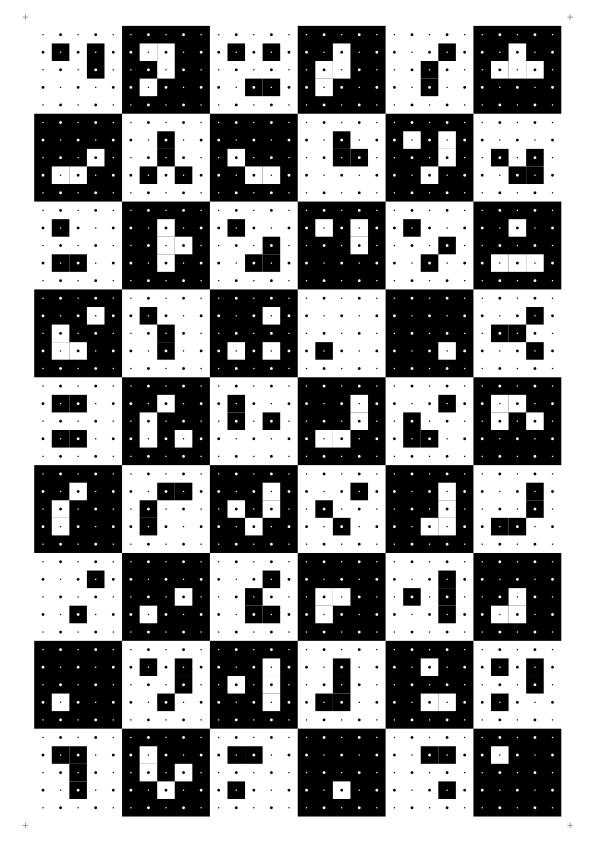
Example: Ocean calibration board for A4 paper with 6x9 markers. Each marker contains a unique 5x5 dot pattern.
Pre-made Calibration Boards
Ocean provides pre-made calibration boards for common paper sizes:
| Paper Size | Markers | File |
|---|---|---|
| A4 | 6x9 | calibrationBoard_a4_6x9.svg |
| A3 | 9x13 | calibrationBoard_a3_9x13.svg |
| Letter | 6x8 | calibrationBoard_letter_6x8.svg |
| Tabloid | 8x13 | calibrationBoard_tabloid_8x13.svg |
These files can be found in: xplat/ocean/res/application/ocean/demo/cv/calibration/creator/
Print the SVG or PDF file at actual size (100% scale, no scaling) to ensure accurate measurements.
Demo Applications
Ocean provides several applications to assist with the camera calibration process:
Creator Application 


The Creator application generates calibration board images and their corresponding JSON configuration files.
Usage:
./Creator --boardSeed 0 --paper a4 --imageType board --output ./
Parameters:
--boardSeed/-bs: Seed value for generating a unique calibration board (default: 0)--paper/-p: Paper size - 'a3', 'a4', 'letter', or 'tabloid' (default: 'a4')--boardDimension/-bd: Explicit marker dimensions, e.g., '6x9' for 6 horizontal and 9 vertical markers--imageType/-it: Type of image to create - 'board', 'markers', 'points', or 'board_with_dot'--output/-o: Output directory for generated files--debugInformation/-di: Include debug information in the output image
The application generates two files:
- An SVG image of the calibration board for printing
- A JSON file containing the board's marker layout definition
PictureTaker Application 

The PictureTaker application is a simple helper app that captures images from a camera for calibration purposes. It's available for Windows, iOS, and Android. Note that you can also use images from any other source - the offline calibrator simply requires a directory of PNG images.
Usage (Windows):
./PictureTaker --input LiveVideoId:0 --resolution 1920x1080 --output ./calibration_images/
Parameters:
--input/-i: Input source (e.g., 'LiveVideoId:0' for first webcam)--resolution/-r: Preferred camera resolution (e.g., '1920x1080')--pixelformat/-p: Preferred pixel format (e.g., 'YUYV16')--output/-o: Output directory for captured images
Best Practices for Capturing Calibration Images:
- Capture 15-30 images from different angles and positions
- Cover the entire frame area with calibration board observations
- Include images where the board is tilted at various angles
- Ensure the calibration board is in sharp focus in all images
- Avoid motion blur and reflections
- Use consistent lighting conditions
Offline Calibrator
The offline calibrator processes a set of captured images to compute the camera's intrinsic parameters.
Usage:
./CameraCalibratorOffline \
    --input ./calibration_images/ \
    --calibrationBoard calibrationBoard_a4_6x9.json \
    --measuredWidth 178.0 \
    --measuredHeight 269.0 \
    --output ./calibration_result/
Parameters:
--input/-i: Directory containing PNG calibration images--calibrationBoard/-cb: Path to calibration board JSON file, or a seed-based definition (e.g., 'calibrationBoard_0_8x11')--measuredWidth/-mw: Measured width of the calibration board's measurement indication in millimeters--measuredHeight/-mh: Measured height of the calibration board's measurement indication in millimeters--cameraModel/-cm: Camera model to use - 'pinhole' or 'fisheye' (auto-detected if not specified)--output/-o: Output directory for calibration results--debugOutput/-do: Output directory for debug visualization images
Measuring the Calibration Board:
The calibration board has measurement indicator marks at its corners, shown as small gray crosses. These marks define the reference points for measuring the physical size of your printed board.
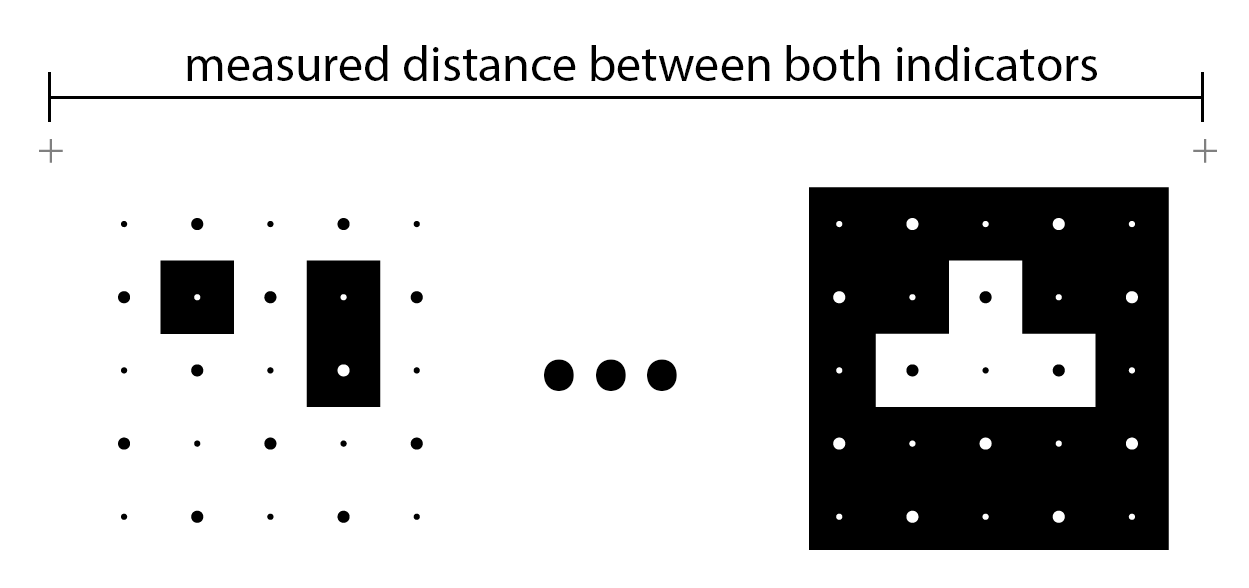
To measure your printed board:
- Use a ruler or caliper to measure the horizontal distance between the left and right gray crosses → this is the
measuredWidth - Measure the vertical distance between the top and bottom gray crosses → this is the
measuredHeight
Accurate measurements are critical for obtaining correct metric scale in the calibration. Even small measurement errors will affect the accuracy of the resulting camera parameters.
Camera Calibration Manager
The CameraCalibrationManager provides a centralized system for storing and retrieving camera calibrations. It uses a JSON-based format that supports:
- Multiple Camera Models: Pinhole and fisheye camera models with various parameter configurations
- Device-Specific Calibrations: Calibrations can be associated with specific device products, versions, or serial numbers
- Resolution Interpolation: Automatically interpolates calibrations for resolutions that share the same aspect ratio
- Priority System: Multiple calibrations can be registered with priorities to select the best match
JSON Calibration Format
Camera calibrations are stored in JSON format. Here's an example:
{
  "devices": [
    {
      "product": "Samsung S21 5G",
      "version": "SM-G991U",
      "cameras": [
        {
          "name": "Back-facing Camera 0",
          "priority": 10,
          "calibrations": [
            {
              "resolution": {"width": 1280, "height": 720},
              "model": "Ocean Pinhole",
              "configuration": "8_PARAMETERS",
              "parameters": [fx, fy, mx, my, k1, k2, p1, p2],
              "comment": "FovX: 66.3 degrees"
            }
          ]
        }
      ]
    }
  ],
  "cameras": [
    {
      "name": "Logitech C920 HD Pro",
      "aliases": ["HD Pro Webcam C920"],
      "priority": 10,
      "calibrations": [
        {
          "resolution": {"width": 1280, "height": 720},
          "model": "Ocean Pinhole",
          "configuration": "8_PARAMETERS",
          "parameters": [963.41, 962.93, 626.06, 362.89, 0.0217, -0.0675, -0.00147, 0.00105]
        }
      ]
    }
  ]
}
Supported Camera Models
Ocean Pinhole - Standard pinhole camera model with optional radial and tangential distortion:
4_PARAMETERS: fx, fy, mx, my (focal lengths and principal point)8_PARAMETERS: fx, fy, mx, my, k1, k2, p1, p2 (with radial and tangential distortion)
Ocean Fisheye - Fisheye camera model for wide-angle lenses:
6_PARAMETERS: fx, fy, mx, my, k3, k5 (polynomial distortion)12_PARAMETERS: fx, fy, mx, my, k3, k5, k7, k9, k11, k13, p1, p2 (full distortion model)
Using the CameraCalibrationManager
#include "ocean/io/CameraCalibrationManager.h"

// Register calibrations from a JSON file
IO::CameraCalibrationManager::get().registerCalibrations("camera_calibration.json");

// Set device context (optional - for device-specific calibrations)
IO::CameraCalibrationManager::get().setDeviceProduct("Samsung S21 5G");
IO::CameraCalibrationManager::get().setDeviceVersion("SM-G991U");

// Retrieve a calibration
SharedAnyCamera camera = IO::CameraCalibrationManager::get().camera(
    "Back-facing Camera 0",  // camera name
    1280,                    // width
    720                      // height
);

if (camera)
{
    // Use the calibrated camera
    Scalar fovX = camera->fovX();
    Vector2 principalPoint = camera->principalPoint();
}
Programmatic Camera Registration
In addition to loading calibrations from JSON files, you can register camera calibrations programmatically using registerCamera(). This is useful when camera parameters are obtained at runtime (e.g., from a calibration process or device API).
#include "ocean/io/CameraCalibrationManager.h"
#include "ocean/math/PinholeCamera.h"

// Create a pinhole camera with known parameters
// Parameters: width, height, focalLengthX, focalLengthY, principalPointX, principalPointY
PinholeCamera pinholeCamera(1280u, 720u, 963.41, 962.93, 626.06, 362.89);

// Add radial and tangential distortion if needed
pinholeCamera.setRadialDistortion({0.0217, -0.0675});
pinholeCamera.setTangentialDistortion({-0.00147, 0.00105});

// Create a shared camera wrapper
SharedAnyCamera anyCamera = std::make_shared<AnyCameraPinhole>(std::move(pinholeCamera));

// Register the camera with a name and priority
// Higher priority values take precedence when multiple calibrations exist for the same camera
IO::CameraCalibrationManager::get().registerCamera(
    "My Custom Camera",  // camera name
    std::move(anyCamera), // camera model
    10                    // priority
);

// The camera can now be retrieved by name and resolution
SharedAnyCamera retrievedCamera = IO::CameraCalibrationManager::get().camera("My Custom Camera", 1280, 720);
Parameters:
cameraName: A unique identifier for the camera (e.g., "Back-facing Camera 0", "Logitech C920")camera: A validSharedAnyCameraobject containing the calibration parameterspriority: An integer priority value. When multiple calibrations exist for the same camera name and resolution, the one with the highest priority is returned
Custom Camera Model Factories
The CameraCalibrationManager comes with built-in support for "Ocean Pinhole" and "Ocean Fisheye" camera models. However, you can extend it to support custom camera models by registering factory functions using registerFactoryFunction().
A factory function parses a JSON calibration object and creates the corresponding camera instance. This allows you to define custom camera models in JSON calibration files and have them automatically instantiated when loading calibrations.
#include "ocean/io/CameraCalibrationManager.h"

// Define a factory function for your custom camera model
SharedAnyCamera createMyCustomCamera(const JSONParser::JSONValue& modelObject)
{
    // Parse the resolution
    const JSONParser::JSONValue* resolutionValue = modelObject.valueFromObject("resolution");
    if (resolutionValue == nullptr || !resolutionValue->isObject())
    {
        return nullptr;
    }

    unsigned int width = (unsigned int)resolutionValue->numberFromObject("width", 0.0);
    unsigned int height = (unsigned int)resolutionValue->numberFromObject("height", 0.0);

    // Parse custom parameters from the JSON
    const JSONParser::JSONValue::Array* params = modelObject.arrayFromObject("parameters");
    if (params == nullptr || params->empty())
    {
        return nullptr;
    }

    // Create your custom camera using the parsed parameters
    // ... your camera creation logic here ...

    return std::make_shared<AnyCameraCustom>(/* your custom camera */);
}

// Register the factory function
IO::CameraCalibrationManager::get().registerFactoryFunction(
    "My Custom Camera",      // model name (matches "model" field in JSON)
    createMyCustomCamera     // factory function
);
Once registered, JSON calibration files can use your custom model:
{
  "cameras": [
    {
      "name": "Custom Sensor",
      "calibrations": [
        {
          "resolution": {"width": 1920, "height": 1080},
          "model": "My Custom Camera",
          "parameters": [/* your custom parameters */]
        }
      ]
    }
  ]
}
Parameters:
modelName: The name of the camera model as it appears in the JSON "model" fieldfactoryFunction: A function that takes aJSONParser::JSONValue&and returns aSharedAnyCamera. Passnullptrto unregister an existing factory
Core Classes
The camera calibration functionality is implemented in these main classes:
CameraCalibrator
The CameraCalibrator class performs the actual calibration computation. It:
- Processes multiple images of a calibration board
- Automatically determines the initial camera field of view
- Optimizes camera intrinsic parameters using non-linear optimization
- Supports both pinhole and fisheye camera models
#include "ocean/cv/calibration/CameraCalibrator.h"

// Create a calibrator with a metric calibration board
CV::Calibration::CameraCalibrator calibrator(metricCalibrationBoard);

// Process images
for (size_t i = 0; i < images.size(); ++i)
{
    calibrator.handleImage(i, images[i], worker);
}

// Finalize calibration
bool needAdditionalIteration;
calibrator.finalize(needAdditionalIteration);

// Get the resulting camera profile
SharedAnyCamera camera = calibrator.camera();
MetricCalibrationBoard
The MetricCalibrationBoard extends the base CalibrationBoard with real-world metric measurements. It's defined in the xz-plane with:
- Measured width and height of the calibration board's measurement indication
- Computed metric size of each marker
- 3D object point positions for all marker dots
CalibrationBoard
The CalibrationBoard class defines the logical structure of a calibration board:
- Grid dimensions (horizontal and vertical marker count)
- Marker IDs, signs, and orientations
- Uniqueness guarantees for marker neighborhoods
Resources
- Calibration Code:
ocean/cv/calibration - Demo Applications:
application/ocean/demo/cv/calibration - Pre-made Calibration Boards:
res/application/ocean/demo/cv/calibration/creator - Example Calibration File:
res/ocean/cv/calibration/camera_calibration.json - CameraCalibrationManager:
ocean/io/CameraCalibrationManager.h